
空间聚类和降噪表达#
空间聚类是空间转录组学分析的重要步骤。
import omicverse as ov
# print(f"OmicVerse version: {ov.__version__}")
import scanpy as sc
# print(f"scanpy version: {单细胞.__version__}")
import numpy as np
🔬 Starting plot initialization...
Using already downloaded Arial font from: /tmp/omicverse_arial.ttf
Registered as: Arial
🧬 Detecting GPU devices…
✅ NVIDIA CUDA GPUs detected: 1
    • [CUDA 0] NVIDIA H100 80GB HBM3
      Memory: 79.1 GB | Compute: 9.0

   ____            _     _    __
  / __ \____ ___  (_)___| |  / /__  _____________
 / / / / __ `__ \/ / ___/ | / / _ \/ ___/ ___/ _ \
/ /_/ / / / / / / / /__ | |/ /  __/ /  (__  )  __/
\____/_/ /_/ /_/_/\___/ |___/\___/_/  /____/\___/

🔖 Version: 1.7.9rc1   📚 Tutorials: https://omicverse.readthedocs.io/
✅ plot_set complete.
预处理数据#
数据预处理包括过滤、标准化和质量控制。
# 加载数据
adata = sc.read_h5ad('data/adata_sample.h5ad')
print(f'数据形状: {adata.shape}')
reading data/151676/151676_filtered_feature_bc_matrix.h5
 (0:00:00)
Note
We introduced 该 spatial special svg calculation module prost 在 OmicVerse versions greater than `1.6.0` 到 replace scanpy's 高可变基因, 如果 you want 到 use scanpy's 高可变基因 you can set mode=`scanpy` 在 `ov.space.svg` 或 use 该 following code.
sc.pp.calculate_qc_metrics(adata, inplace=True)adata = adata[:,adata.var['total_counts']>100]adata=ov.space.svg(adata,mode='pearsonr',n_svgs=3000, target_sum=1e4,platform="visium",)adata
🔍 [2026-01-08 00:32:43] Running preprocessing in 'cpu' mode...
Begin robust gene identification
    After filtration, 10747/10747 genes are kept.
    Among 10747 genes, 10747 genes are robust.
✅ Robust gene identification completed successfully.
Begin size normalization: shiftlog and HVGs selection pearson

🔍 Count Normalization:
   Target sum: 10000.0
   Exclude highly expressed: True
   Max fraction threshold: 0.2
   ⚠️ Excluding 0 highly-expressed genes from normalization computation
   Excluded genes: []

✅ Count Normalization Completed Successfully!
   ✓ Processed: 3,460 cells × 10,747 genes
   ✓ Runtime: 0.14s

🔍 Highly Variable Genes Selection (Experimental):
   Method: pearson_residuals
   Target genes: 3,000
   Theta (overdispersion): 100

✅ Experimental HVG Selection Completed Successfully!
   ✓ Selected: 3,000 highly variable genes out of 10,747 total (27.9%)
   ✓ Results added to AnnData object:
     • 'highly_variable': Boolean vector (adata.var)
     • 'highly_variable_rank': Float vector (adata.var)
     • 'highly_variable_nbatches': Int vector (adata.var)
     • 'highly_variable_intersection': Boolean vector (adata.var)
     • 'means': Float vector (adata.var)
     • 'variances': Float vector (adata.var)
     • 'residual_variances': Float vector (adata.var)
    Time to analyze data in cpu: 1.34 seconds.
computing PCA
    with n_comps=50
    finished (0:00:01)
✅ Preprocessing completed successfully.
    Added:
        'highly_variable_features', boolean vector (adata.var)
        'means', float vector (adata.var)
        'variances', float vector (adata.var)
        'residual_variances', float vector (adata.var)
        'counts', raw counts layer (adata.layers)
    End of size normalization: shiftlog and HVGs selection pearson
AnnData object with n_obs × n_vars = 3460 × 10747
    obs: 'in_tissue', 'array_row', 'array_col', 'n_genes_by_counts', 'log1p_n_genes_by_counts', 'total_counts', 'log1p_total_counts', 'pct_counts_in_top_50_genes', 'pct_counts_in_top_100_genes', 'pct_counts_in_top_200_genes', 'pct_counts_in_top_500_genes'
    var: 'gene_ids', 'feature_types', 'genome', 'n_cells_by_counts', 'mean_counts', 'log1p_mean_counts', 'pct_dropout_by_counts', 'total_counts', 'log1p_total_counts', 'n_cells', 'percent_cells', 'robust', 'highly_variable_features', 'means', 'variances', 'residual_variances', 'highly_variable_rank', 'highly_variable', 'space_variable_features'
    uns: 'spatial', 'log1p', 'hvg', 'pca', 'status', 'status_args', 'REFERENCE_MANU'
    obsm: 'spatial', 'X_pca'
    varm: 'PCs'
    layers: 'counts'
adata.write('data/cluster_svg.h5ad',compression='gzip')
adata=ov.read('data/cluster_svg.h5ad',compression='gzip')
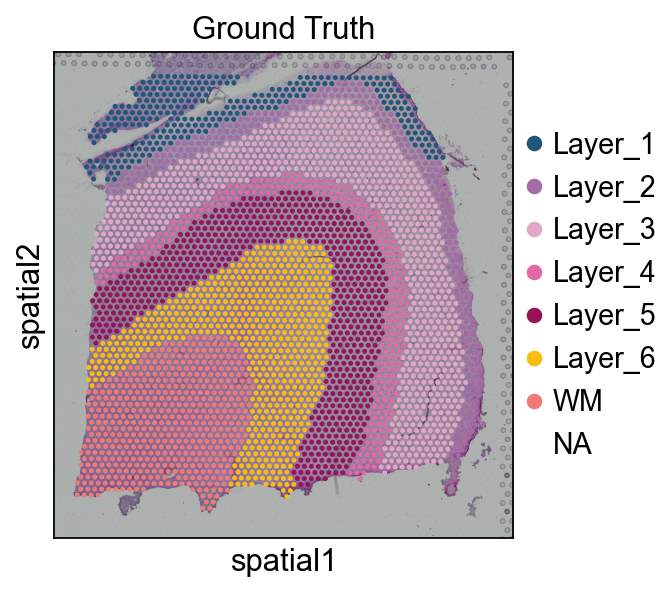
(Optional) We 读取 该 ground truth area 的 our spatial dataThis 步骤 is not mandatory 到 run, 在 该 教程, it’s just 到 demonstrate 该 accuracy 的 our 聚类分析 effect, 和 在 your own tasks, there is often no Ground_truth
# 读取 该 annotationimport Pandas 作为 pdimport osAnn_df = pd.read_csv(os.路径.join('数据/151676', '151676_truth.txt'), sep='\t', header=None, index_col=0)Ann_df.columns = ['Ground Truth']adata.obs['Ground Truth'] = Ann_df.loc[adata.obs_names, 'Ground Truth']单细胞.pl.spatial(adata, img_key="hires", 颜色=["Ground Truth"])
Method1: GraphSTGraphST was rated 作为 one 的 该 best spatial 聚类分析 algorithms 在 Nature 方法 2024.04, so we first tried 到 call GraphST 对于 spatial domain identification 在 OmicVerse.#
methods_kwargs={}methods_kwargs['GraphST']={ 'device':'cuda:0', 'n_pcs':30}adata=ov.space.clusters(adata, methods=['GraphST'], methods_kwargs=methods_kwargs, lognorm=1e4)
The GraphST method is used to embed the spatial data.
Begin to train ST data...
Optimization finished for ST data!
computing PCA
    with n_comps=30
    finished (0:00:01)
GraphST embedding has been saved in adata.obsm["GraphST_embedding"]                         and adata.obsm["graphst|original|X_pca"]
The GraphST embedding are stored in adata.obsm["GraphST_embedding"].
Shape: (3460, 3000)
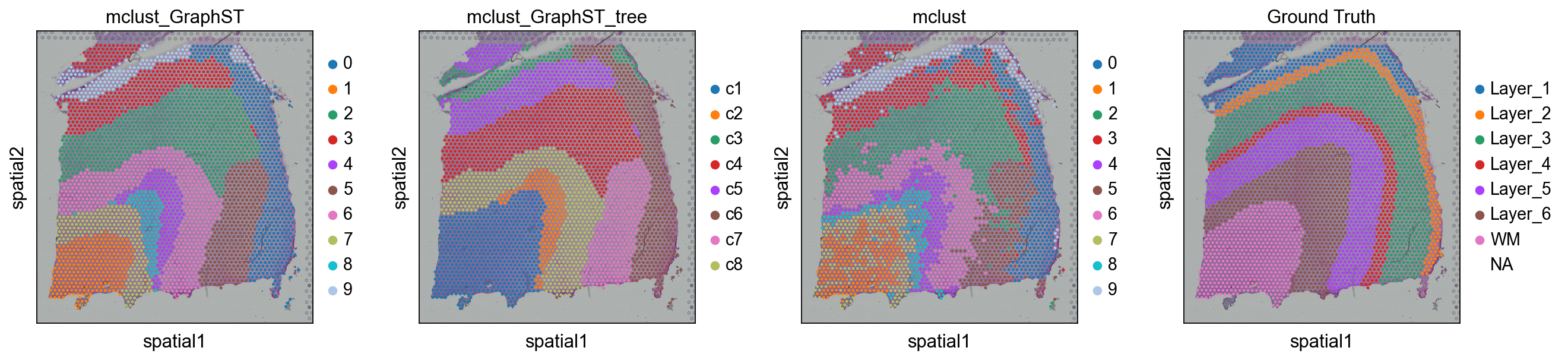
ov.utils.cluster(adata,use_rep='graphst|original|X_pca',method='mclust',n_components=10, modelNames='EEV', random_state=112, )adata.obs['mclust_GraphST'] = ov.utils.refine_label(adata, radius=50, key='mclust') adata.obs['mclust_GraphST']=adata.obs['mclust_GraphST'].astype('category')
running GaussianMixture clustering
finished: found 10 clusters and added
    'mclust', the cluster labels (adata.obs, categorical)
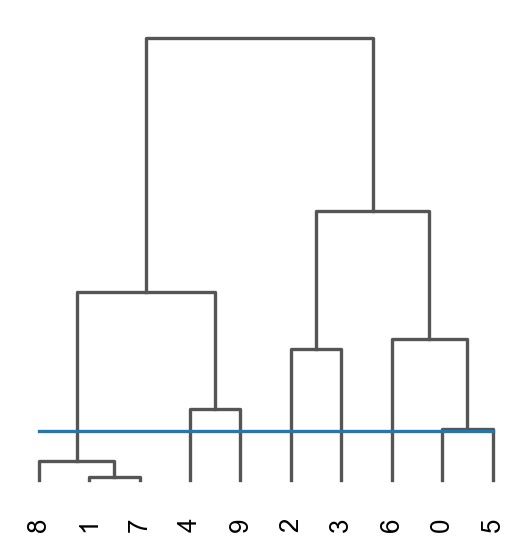
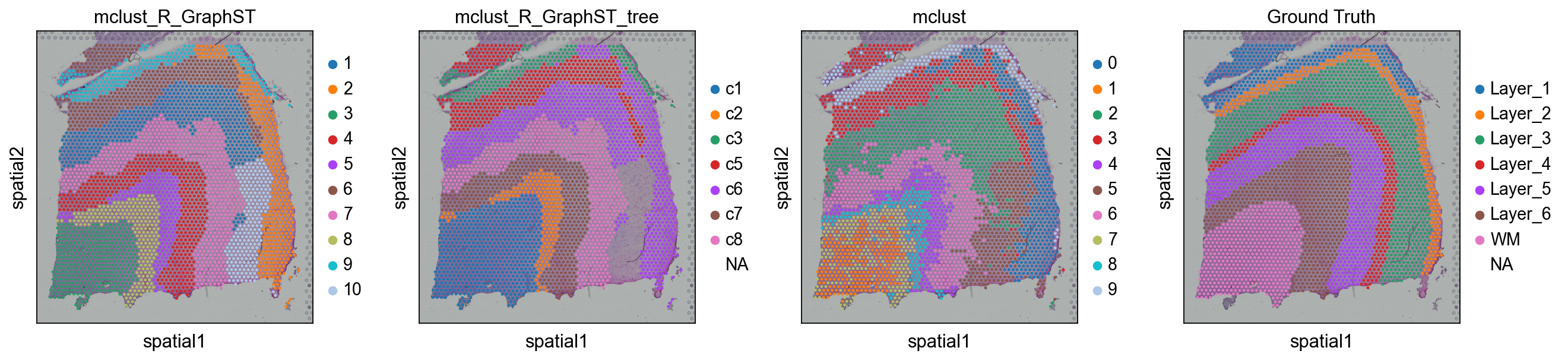
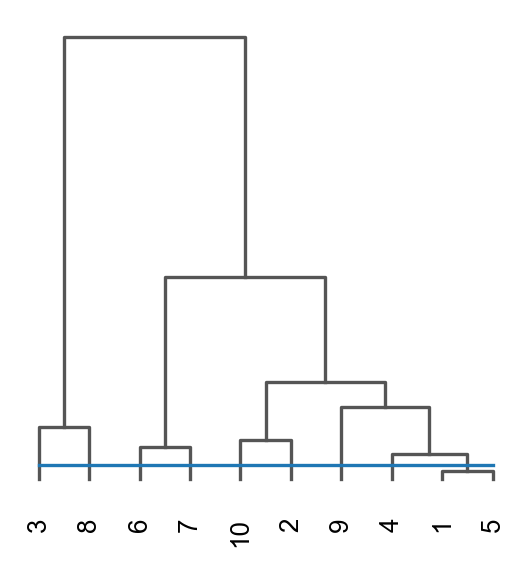
res=ov.space.merge_cluster(adata,groupby='mclust_GraphST',use_rep='graphst|original|X_pca', threshold=0.2,plot=True)
Storing dendrogram info using `.uns['dendrogram_mclust_GraphST']`
The merged cluster information is stored in adata.obs["mclust_GraphST_tree"].
sc.pl.spatial(adata, color=['mclust_GraphST','mclust_GraphST_tree','mclust','Ground Truth'])
我们可以 also use mclust_R 到 聚类 该 spatial domain, but 此 方法 need 到 安装 rpy2 在 first.该 use 的 该 mclust algorithm requires 该 rpy2 package 和 该 mclust package. See https://pypi.org/project/rpy2/ 和 https://cran.r-project.org/web/packages/mclust/index.html 对于 detail.
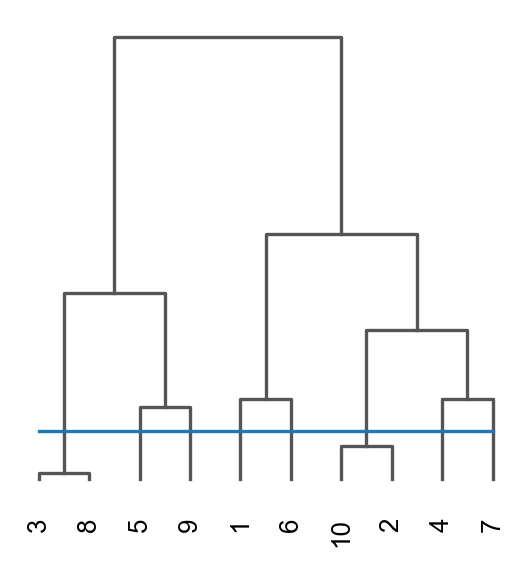
ov.utils.cluster(adata,use_rep='graphst|original|X_pca',method='mclust_R',n_components=10, random_state=42, )adata.obs['mclust_R_GraphST'] = ov.utils.refine_label(adata, radius=30, key='mclust_R') adata.obs['mclust_R_GraphST']=adata.obs['mclust_R_GraphST'].astype('category')res=ov.space.merge_cluster(adata,groupby='mclust_R_GraphST',use_rep='graphst|original|X_pca', threshold=0.2,plot=True)
fitting ...
  |======================================================================| 100%
finished: found 10 clusters and added
    'mclust', the cluster labels (adata.obs, categorical)
Storing dendrogram info using `.uns['dendrogram_mclust_R_GraphST']`
The merged cluster information is stored in adata.obs["mclust_R_GraphST_tree"].
sc.pl.spatial(adata, color=['mclust_R_GraphST','mclust_R_GraphST_tree','mclust','Ground Truth'])
Method2: BINARYBINARY outperforms existing 方法 across various SRT 数据 types 当 using significantly less input information.如果 your 数据 is very large, 或 very 稀疏, I believe BINARY would be a great choice.#
methods_kwargs={}methods_kwargs['BINARY']={ 'use_method':'KNN', 'cutoff':6, 'obs_key':'BINARY_sample', 'use_list':None, 'pos_weight':10, 'device':'cuda:0', 'hidden_dims':[512, 30], 'n_epochs': 1000, 'lr': 0.001, 'key_added': 'BINARY', 'gradient_clipping': 5, 'weight_decay': 0.0001, 'verbose': True, 'random_seed':0, 'lognorm':1e4, 'n_top_genes':2000,}adata=ov.space.clusters(adata, methods=['BINARY'], methods_kwargs=methods_kwargs)
The BINARY method is used to embed the spatial data.
Recover the counts matrix from log-normalized data.
extracting highly variable genes
--> added
    'highly_variable', boolean vector (adata.var)
    'highly_variable_rank', float vector (adata.var)
    'means', float vector (adata.var)
    'variances', float vector (adata.var)
    'variances_norm', float vector (adata.var)
------Constructing spatial graph...------
The graph contains 20760 edges, 3460 cells.
6.0000 neighbors per cell on average.
Size of Input:  (3460, 2000)
The binary embedding are stored in adata.obsm["BINARY"].
Shape: (3460, 30)
如果 you want 到 use R’s mclust, you can use ov.utils.cluster.But you need 到 安装 rpy2 和 mclust 在 first.
ov.utils.cluster(adata,use_rep='BINARY',method='mclust_R',n_components=10, random_state=42, )adata.obs['mclust_BINARY'] = ov.utils.refine_label(adata, radius=30, key='mclust_R') adata.obs['mclust_BINARY']=adata.obs['mclust_BINARY'].astype('category')
fitting ...
  |======================================================================| 100%
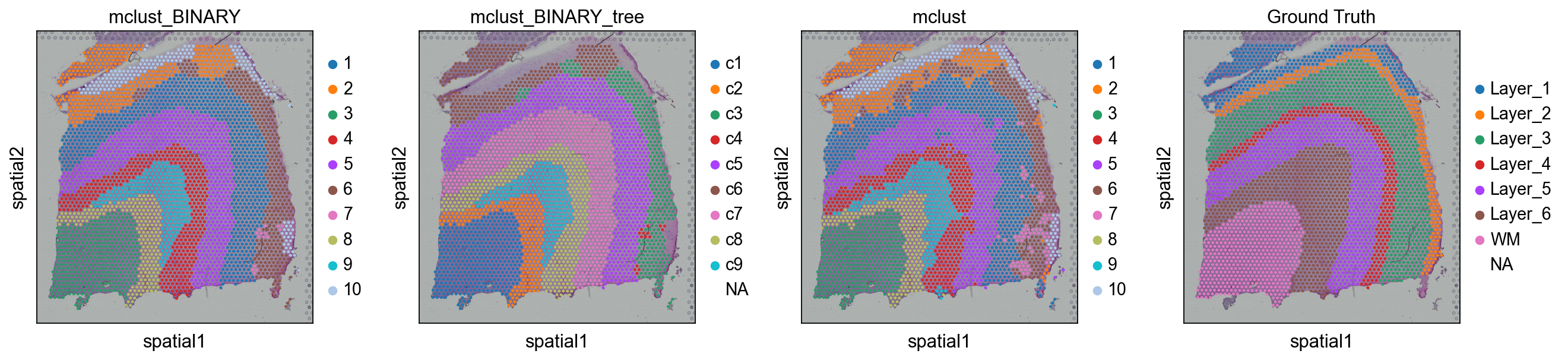
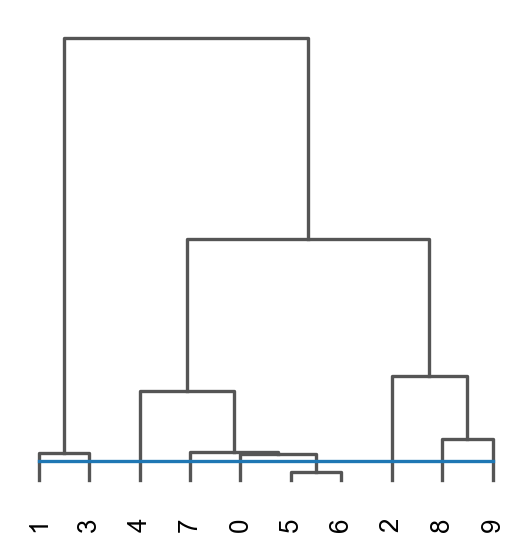
res=ov.space.merge_cluster(adata,groupby='mclust_BINARY',use_rep='BINARY', threshold=0.01,plot=True)
Storing dendrogram info using `.uns['dendrogram_mclust_BINARY']`
The merged cluster information is stored in adata.obs["mclust_BINARY_tree"].
sc.pl.spatial(adata, color=['mclust_BINARY','mclust_BINARY_tree','mclust','Ground Truth'])
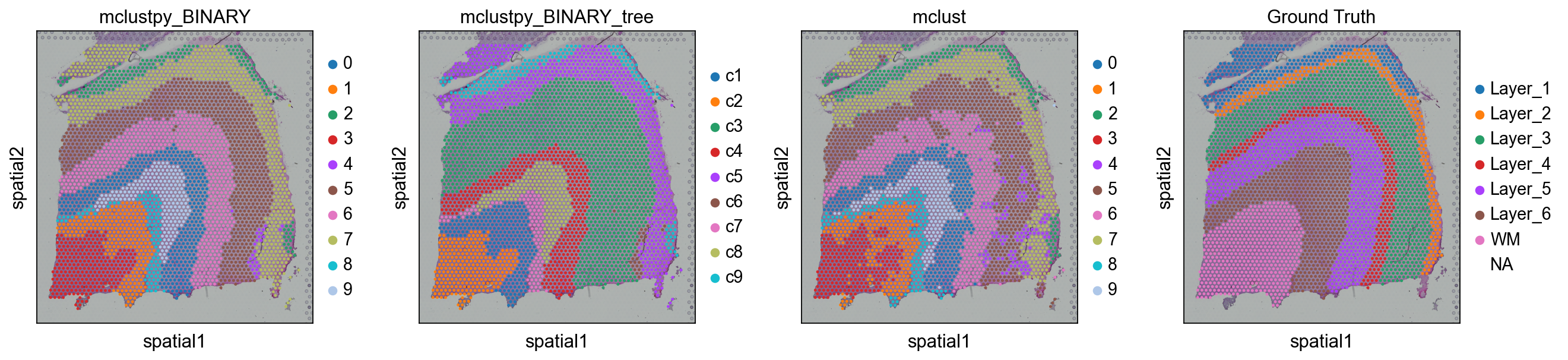
ov.utils.cluster(adata,use_rep='BINARY',method='mclust',n_components=10, modelNames='EEV', random_state=42, )adata.obs['mclustpy_BINARY'] = ov.utils.refine_label(adata, radius=30, key='mclust') adata.obs['mclustpy_BINARY']=adata.obs['mclustpy_BINARY'].astype('category')
running GaussianMixture clustering
finished: found 10 clusters and added
    'mclust', the cluster labels (adata.obs, categorical)
adata.obs['mclustpy_BINARY']=adata.obs['mclustpy_BINARY'].astype('category')res=ov.space.merge_cluster(adata,groupby='mclustpy_BINARY',use_rep='BINARY', threshold=0.013,plot=True)
Storing dendrogram info using `.uns['dendrogram_mclustpy_BINARY']`
The merged cluster information is stored in adata.obs["mclustpy_BINARY_tree"].
sc.pl.spatial(adata, color=['mclustpy_BINARY','mclustpy_BINARY_tree','mclust','Ground Truth'])# adata.obs['mclust_BINARY'] = ov.utils.refine_label(adata, radius=30, key='mclust') #adata.obs['mclust_BINARY']=adata.obs['mclust_BINARY'].astype('category')
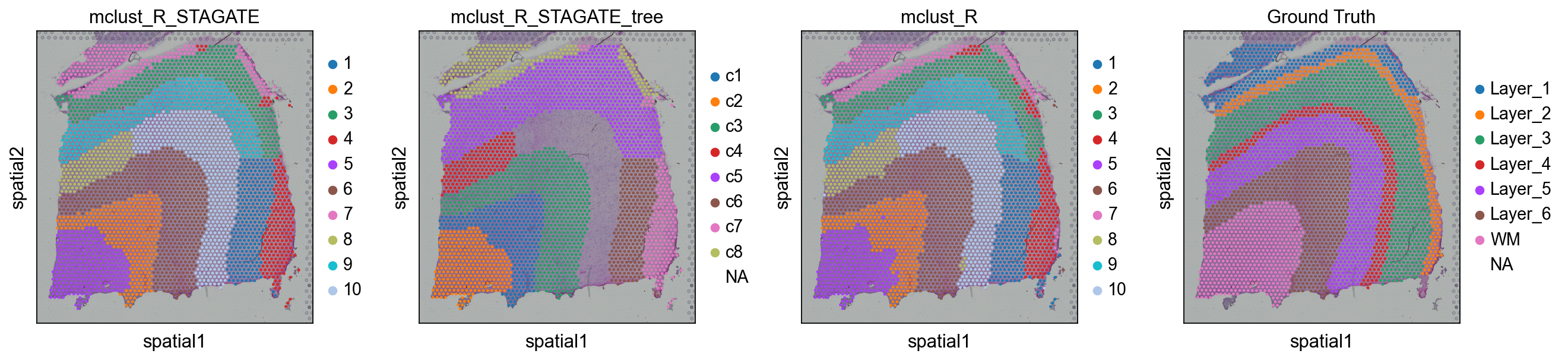
Method3: STAGATESTAGATE is designed 对于 spatial 聚类分析 和 denoising expressions 的 spatial resolved transcriptomics (空间转录组) 数据.STAGATE learns 低-dimensional 潜在 嵌入 使用 both spatial information 和 基因 expressions via a graph attention auto-encoder. 该 方法 adopts an attention mechanism 在 该 middle layer 的 该 encoder 和 decoder, which adaptively learns 该 edge weights 的 spatial neighbor networks, 和 further uses them 到 update 该 点位 representation 通过 collectively aggregating information 从 its neighbors. 该 潜在 嵌入 和 该 reconstructed 表达 profiles can be used 到 downstream tasks such 作为 spatial domain identification, 可视化, spatial trajectory inference, 数据 denoising 和 3D 表达 domain extraction.Dong, Kangning, 和 Shihua Zhang. “Deciphering spatial domains 从 spatially resolved transcriptomics 使用 an adaptive graph attention auto-encoder.” Nature Communications 13.1 (2022): 1-12.Here, we used ov.space.pySTAGATE 到 construct a STAGATE object 到 train 该 model.#
methods_kwargs={}methods_kwargs['STAGATE']={ 'num_batch_x':3,'num_batch_y':2, 'spatial_key':['X','Y'],'rad_cutoff':200, 'num_epoch':1000,'lr':0.001, 'weight_decay':1e-4,'hidden_dims':[512, 30], 'device':'cuda:0', # 'n_top_genes':2000,}adata=ov.space.clusters(adata, 方法=['STAGATE'], methods_kwargs=methods_kwargs)
The STAGATE method is used to cluster the spatial data.
------Calculating spatial graph...
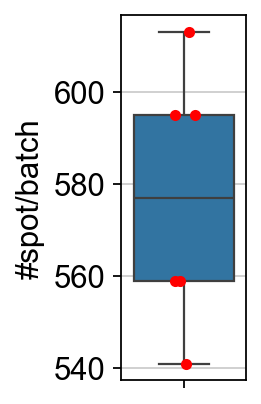
The graph contains 3060 edges, 559 cells.
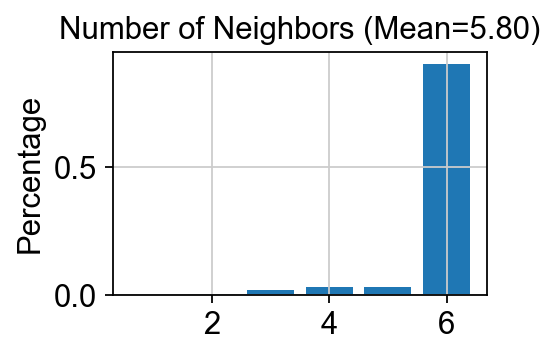
5.4741 neighbors per cell on average.
------Calculating spatial graph...
The graph contains 3328 edges, 595 cells.
5.5933 neighbors per cell on average.
------Calculating spatial graph...
The graph contains 3448 edges, 613 cells.
5.6248 neighbors per cell on average.
------Calculating spatial graph...
The graph contains 3044 edges, 541 cells.
5.6266 neighbors per cell on average.
------Calculating spatial graph...
The graph contains 3128 edges, 559 cells.
5.5957 neighbors per cell on average.
------Calculating spatial graph...
The graph contains 3320 edges, 595 cells.
5.5798 neighbors per cell on average.
------Calculating spatial graph...
The graph contains 20052 edges, 3460 cells.
5.7954 neighbors per cell on average.
The STAGATE representation values are stored in adata.obsm["STAGATE"].
The rex values are stored in adata.layers["STAGATE_ReX"].
The STAGATE embedding are stored in adata.obsm["STAGATE"].
Shape: (3460, 30)
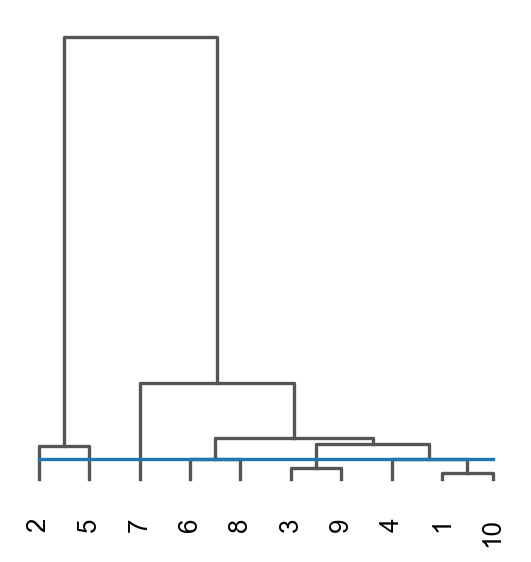
ov.utils.cluster(adata,use_rep='STAGATE',method='mclust_R',n_components=10, random_state=112, )adata.obs['mclust_R_STAGATE'] = ov.utils.refine_label(adata, radius=30, key='mclust_R') adata.obs['mclust_R_STAGATE']=adata.obs['mclust_R_STAGATE'].astype('category')res=ov.space.merge_cluster(adata,groupby='mclust_R_STAGATE',use_rep='STAGATE', threshold=0.005,plot=True)
fitting ...
  |======================================================================| 100%
finished: found 10 clusters and added
    'mclust', the cluster labels (adata.obs, categorical)
Storing dendrogram info using `.uns['dendrogram_mclust_R_STAGATE']`
The merged cluster information is stored in adata.obs["mclust_R_STAGATE_tree"].
sc.pl.spatial(adata, color=['mclust_R_STAGATE','mclust_R_STAGATE_tree','mclust_R','Ground Truth'])
Denoising#
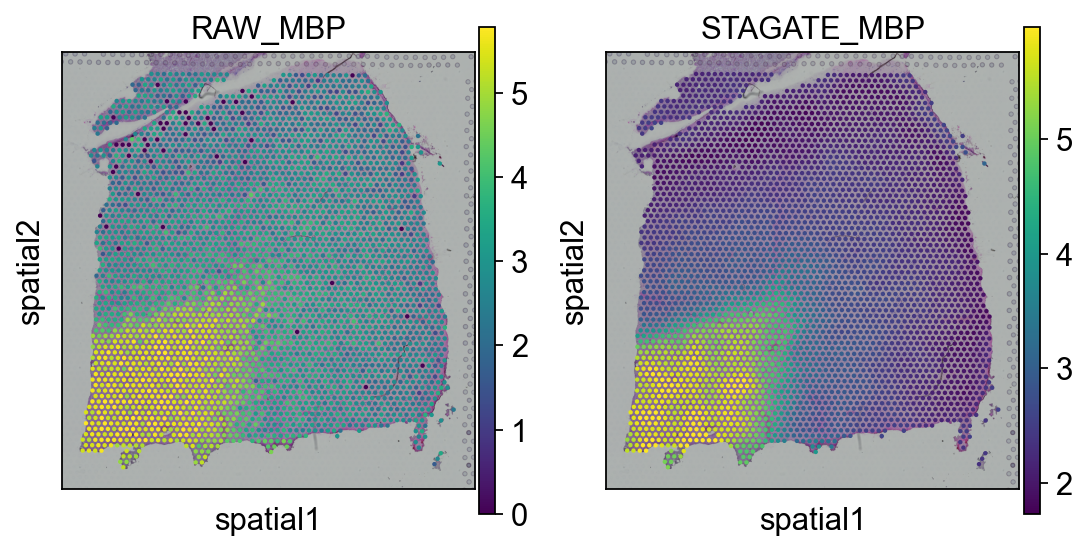
adata.var.sort_values('PI',ascending=False).head(5)
| gene_ids | feature_types | genome | n_cells_by_counts | mean_counts | log1p_mean_counts | pct_dropout_by_counts | total_counts | log1p_total_counts | n_cells | SEP | SIG | PI | Moran_I | Geary_C | p_norm | p_rand | fdr_norm | fdr_rand | space_variable_features | |
|---|---|---|---|---|---|---|---|---|---|---|---|---|---|---|---|---|---|---|---|---|
| MBP | ENSG00000197971 | Gene Expression | GRCh38 | 3411 | 15.419075 | 2.798444 | 1.416185 | 53350.0 | 10.884648 | 3411 | 0.823299 | 0.214148 | 1.000000 | 0.910362 | 0.092733 | 0.0 | 0.0 | 0.0 | 0.0 | True |
| GFAP | ENSG00000131095 | Gene Expression | GRCh38 | 2938 | 3.930347 | 1.595409 | 15.086705 | 13599.0 | 9.517825 | 2938 | 0.694169 | 0.129941 | 0.587889 | 0.743831 | 0.255528 | 0.0 | 0.0 | 0.0 | 0.0 | True |
| PLP1 | ENSG00000123560 | Gene Expression | GRCh38 | 3214 | 9.255780 | 2.327842 | 7.109827 | 32025.0 | 10.374304 | 3214 | 0.668771 | 0.099919 | 0.478698 | 0.737326 | 0.264750 | 0.0 | 0.0 | 0.0 | 0.0 | True |
| MT-ND1 | ENSG00000198888 | Gene Expression | GRCh38 | 3460 | 74.200577 | 4.320159 | 0.000000 | 256734.0 | 12.455800 | 3460 | 0.362000 | 0.163292 | 0.359299 | 0.740392 | 0.262487 | 0.0 | 0.0 | 0.0 | 0.0 | True |
| MT-CO1 | ENSG00000198804 | Gene Expression | GRCh38 | 3460 | 115.025436 | 4.753809 | 0.000000 | 397988.0 | 12.894179 | 3460 | 0.472005 | 0.100106 | 0.338241 | 0.755924 | 0.246897 | 0.0 | 0.0 | 0.0 | 0.0 | True |
plot_gene = 'MBP'import matplotlib.pyplot as pltfig, axs = plt.subplots(1, 2, figsize=(8, 4))sc.pl.spatial(adata, img_key="hires", color=plot_gene, show=False, ax=axs[0], title='RAW_'+plot_gene, vmax='p99')sc.pl.spatial(adata, img_key="hires", color=plot_gene, show=False, ax=axs[1], title='STAGATE_'+plot_gene, layer='STAGATE_ReX', vmax='p99')
[<AxesSubplot: title={'center': 'STAGATE_MBP'}, xlabel='spatial1', ylabel='spatial2'>]
Method4: CASTCAST would be a great algorithm 如果 your spatial transcriptome is 在 单细胞 resolution 和 在 multiple slices.#
methods_kwargs={}methods_kwargs['CAST']={ 'output_path_t':'result/CAST_gas/output', 'device':'cuda:0', 'gpu_t':0}adata=ov.space.clusters(adata, methods=['CAST'], methods_kwargs=methods_kwargs)
The CAST method is used to embed the spatial data.
normalizing counts per cell
    finished (0:00:00)
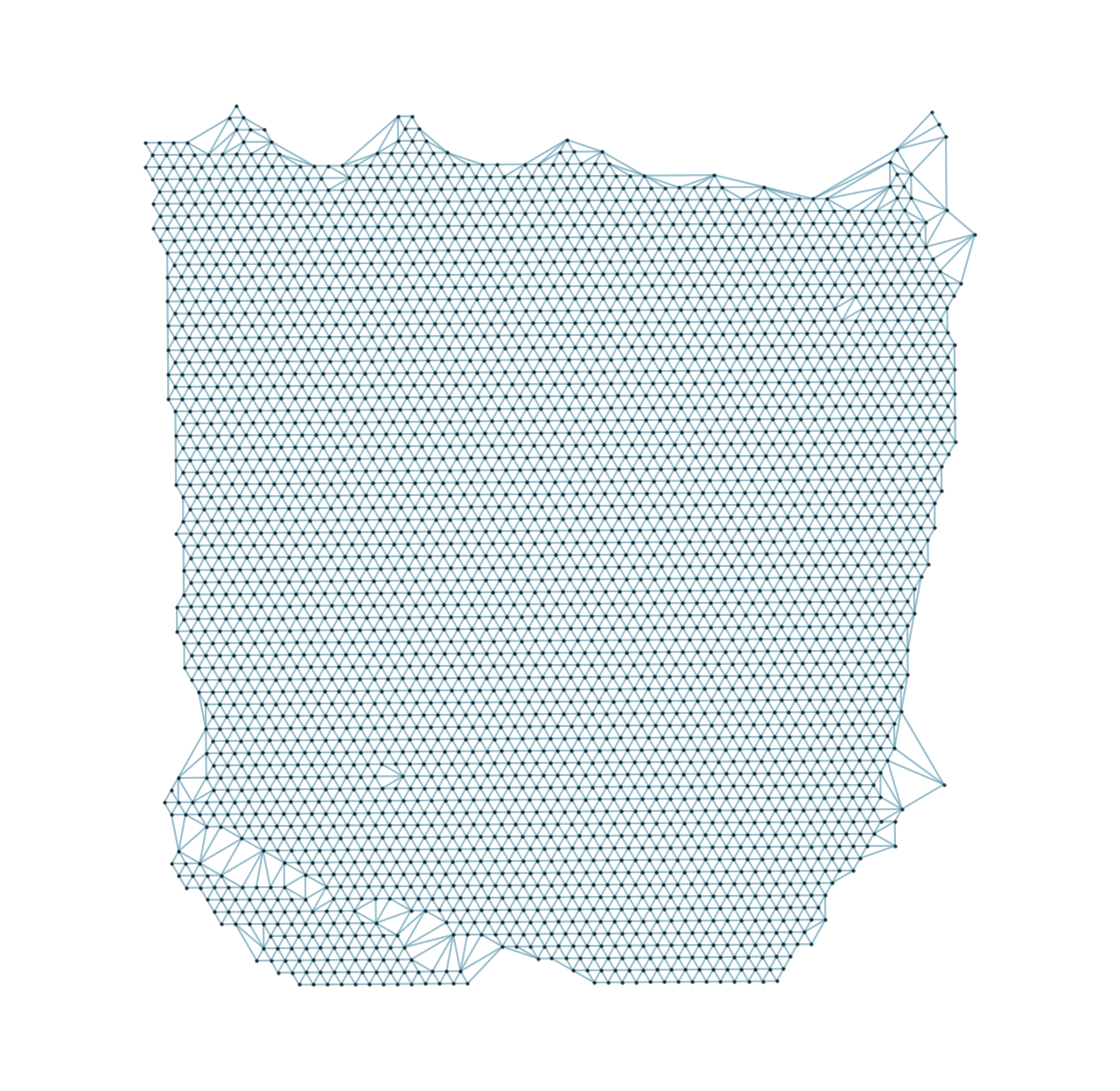
Constructing delaunay graphs for 1 samples...
Training on cuda:0...
Finished.
The embedding, log, model files were saved to result/CAST_gas/output
The CAST embedding are stored in adata.obsm["X_cast"].
Shape: (3460, 512)
ov.utils.cluster(adata,use_rep='X_cast',method='mclust',n_components=10, modelNames='EEV', random_state=42, )adata.obs['mclust_CAST'] = ov.utils.refine_label(adata, radius=50, key='mclust') adata.obs['mclust_CAST']=adata.obs['mclust_CAST'].astype('category')
running GaussianMixture clustering
finished: found 10 clusters and added
    'mclust', the cluster labels (adata.obs, categorical)
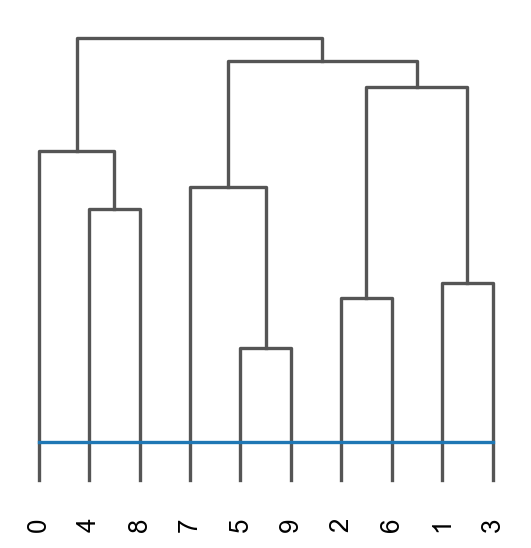
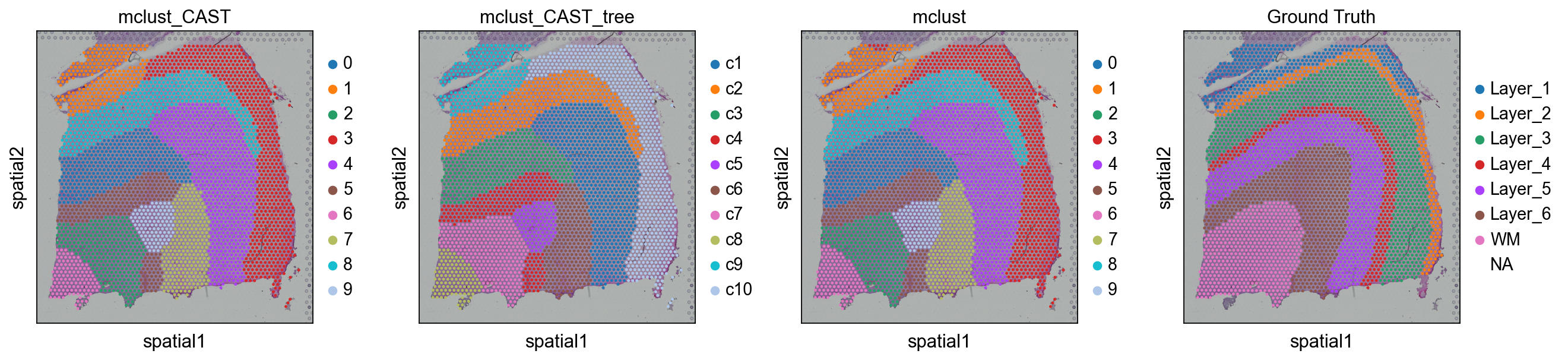
res=ov.space.merge_cluster(adata,groupby='mclust_CAST',use_rep='X_cast', threshold=0.1,plot=True)
Storing dendrogram info using `.uns['dendrogram_mclust_CAST']`
The merged cluster information is stored in adata.obs["mclust_CAST_tree"].
sc.pl.spatial(adata, color=['mclust_CAST','mclust_CAST_tree','mclust','Ground Truth'])
Method5: Banksy#
methods_kwargs={}methods_kwargs['Banksy']={ 'num_neighbours':15, 'nbr_weight_decay':'scaled_gaussian', 'max_m':1, 'lambda_list':[0.2], 'resolutions':[0.8], 'add_nonspatial':False, 'variance_balance':False, 'match_labels':False, 'filepath':'tmp/banksy',}adata=ov.space.clusters( adata, methods=['Banksy'], methods_kwargs=methods_kwargs)
Median distance to closest cell = 137.00364958642524

---- Ran median_dist_to_nearest_neighbour in 0.01 s ----

---- Ran generate_spatial_distance_graph in 0.01 s ----

---- Ran row_normalize in 0.01 s ----

---- Ran generate_spatial_weights_fixed_nbrs in 0.06 s ----

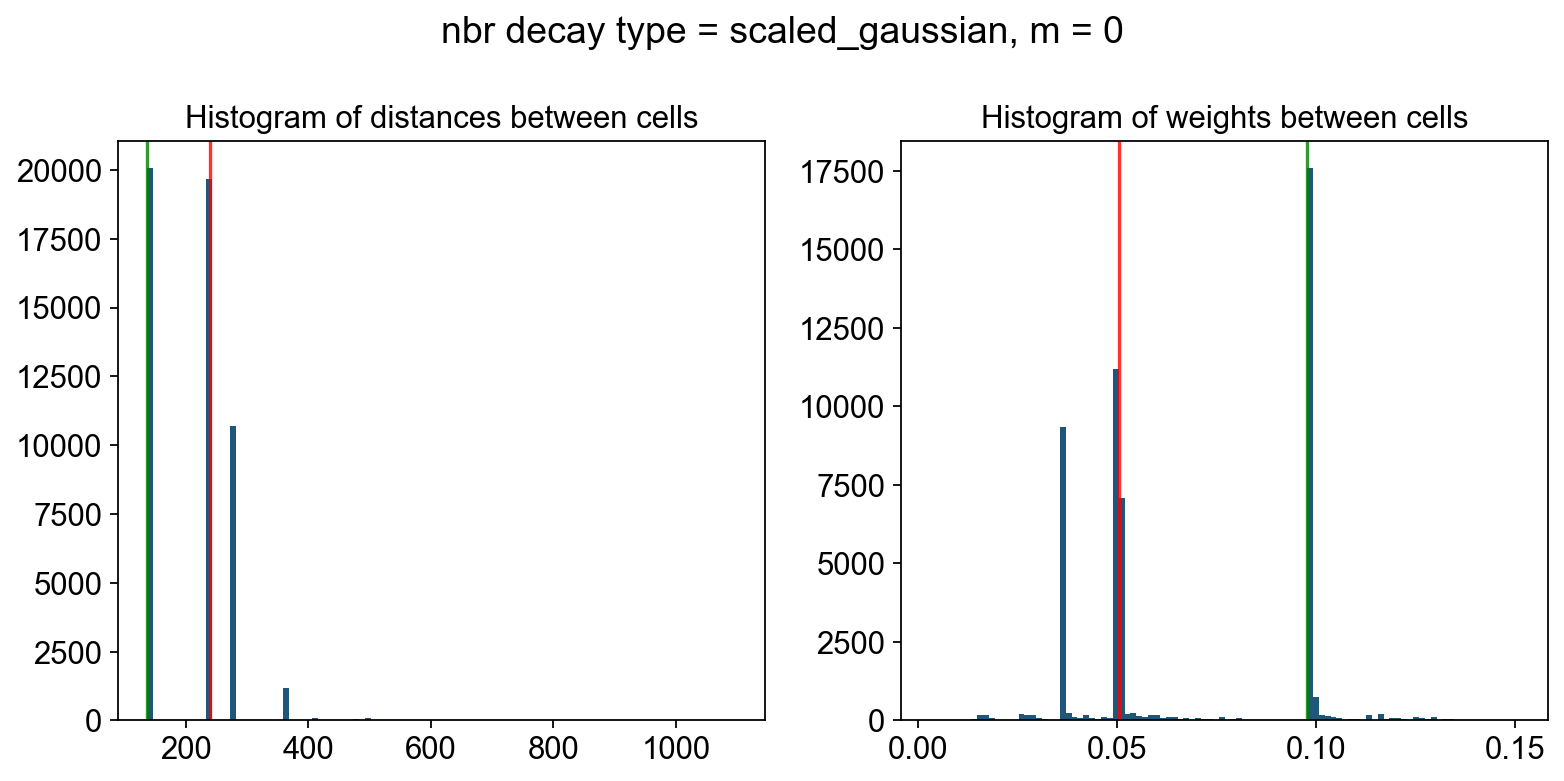
----- Plotting Edge Histograms for m = 0 -----

Edge weights (distances between cells): median = 238.76766950322232, mode = 137.00364958642524

---- Ran plot_edge_histogram in 0.04 s ----


Edge weights (weights between cells): median = 0.05057751576626019, mode = 0.09776579868038085

---- Ran plot_edge_histogram in 0.03 s ----

---- Ran generate_spatial_distance_graph in 0.02 s ----

---- Ran theta_from_spatial_graph in 0.02 s ----

---- Ran row_normalize in 0.01 s ----

---- Ran generate_spatial_weights_fixed_nbrs in 0.09 s ----

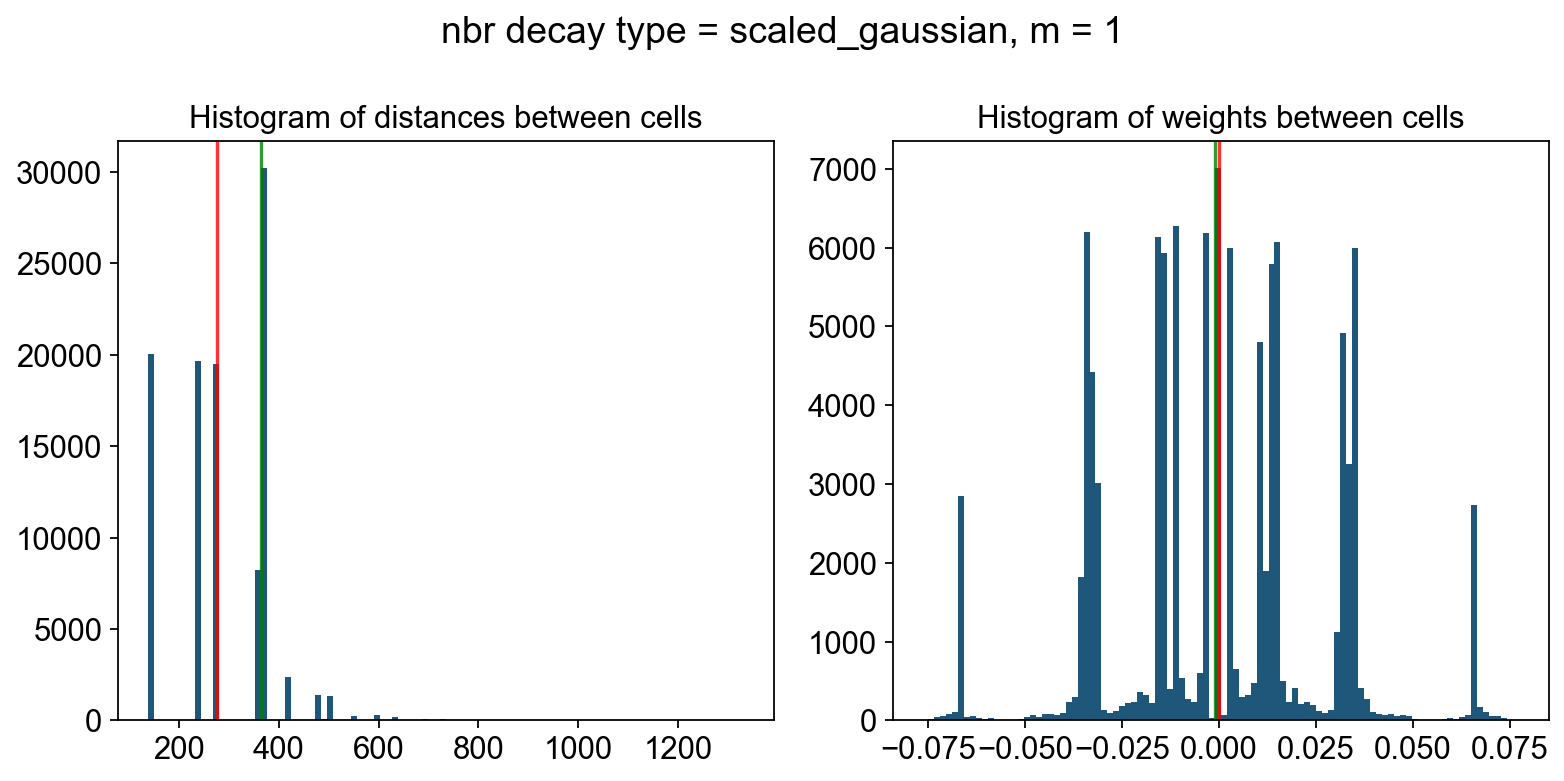
----- Plotting Edge Histograms for m = 1 -----

Edge weights (distances between cells): median = 276.2354068543712, mode = 364.36272904465324

---- Ran plot_edge_histogram in 0.04 s ----


Edge weights (weights between cells): median = (-5.2515238544983064e-05+0.008384965165521282j), mode = -0.001080415232691187

---- Ran plot_edge_histogram in 0.04 s ----

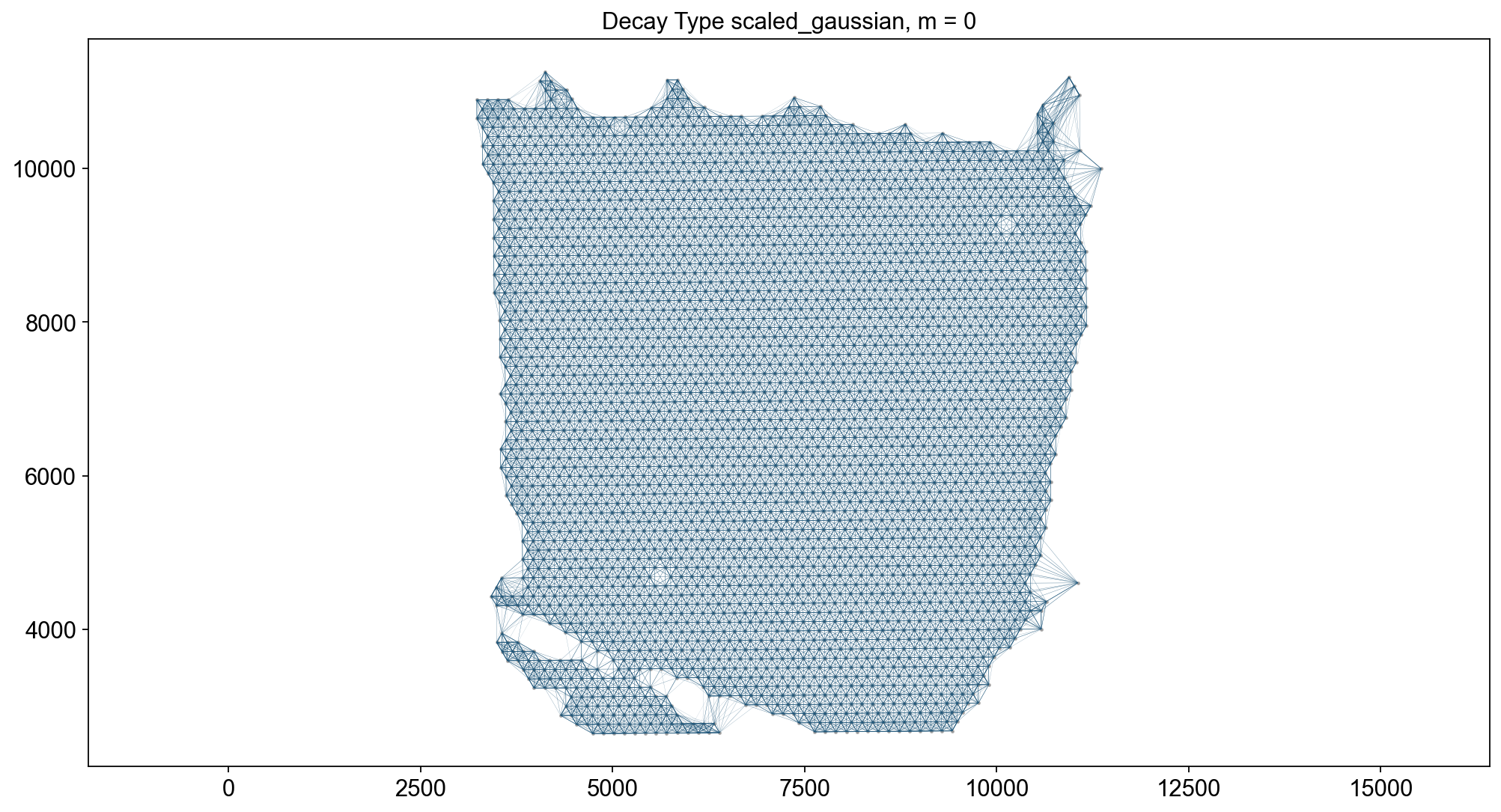
----- Plotting Weights Graph -----
Maximum weight: 0.15104274121695466

---- Ran plot_graph_weights in 0.33 s ----

Maximum weight: (0.07735695704637852+0.0005605576383513445j)

---- Ran plot_graph_weights in 0.64 s ----

----- Plotting theta Graph -----
Runtime Jan-08-2026-00-33

10747 genes to be analysed:
Gene List:
Index(['NOC2L', 'KLHL17', 'HES4', 'ISG15', 'AGRN', 'C1orf159', 'SDF4',
       'B3GALT6', 'UBE2J2', 'SCNN1D',
       ...
       'MT-ATP8', 'MT-ATP6', 'MT-CO3', 'MT-ND3', 'MT-ND4L', 'MT-ND4', 'MT-ND5',
       'MT-ND6', 'MT-CYB', 'AC007325.4'],
      dtype='object', length=10747)

Check if X contains only finite (non-NAN) values
Decay Type: scaled_gaussian
Weights Object: {'weights': {0: <3460x3460 sparse matrix of type '<class 'numpy.float64'>'
	with 51900 stored elements in Compressed Sparse Row format>, 1: <3460x3460 sparse matrix of type '<class 'numpy.complex128'>'
	with 103800 stored elements in Compressed Sparse Row format>}}

Nbr matrix | Mean: 0.27 | Std: 0.42
Size of Nbr | Shape: (3460, 10747)
Top 3 entries of Nbr Mat:

[[0.34965952 0.10314547 0.25060342]
 [0.03750811 0.         0.3298474 ]
 [0.24471095 0.20862651 0.39286428]]

AGF matrix | Mean: 0.09 | Std: 0.09
Size of AGF mat (m = 1) | Shape: (3460, 10747)
Top entries of AGF:
[[0.09590092 0.07119773 0.09831454]
 [0.02268589 0.0157818  0.08236299]
 [0.10259601 0.14517428 0.09064761]]
Ran 'Create BANKSY Matrix' in 0.1 mins

Cell by gene matrix has shape (3460, 10747)

Scale factors squared: [0.8        0.13333333 0.06666667]
Scale factors: [0.89442719 0.36514837 0.25819889]
Shape of BANKSY matrix: (3460, 32241)
Type of banksy_matrix: <class 'anndata._core.anndata.AnnData'>

Current decay types: ['scaled_gaussian']

Reducing dims of dataset in (Index = scaled_gaussian, lambda = 0.2)
==================================================

Setting the total number of PC = 20
Original shape of matrix: (3460, 32241)
Reduced shape of matrix: (3460, 20)
------------------------------------------------------------
min_value = -32.08530858175148, mean = 4.189327112574001e-17, max = 71.19746300495925

Conducting clustering with Leiden Parition
Decay type: scaled_gaussian
Neighbourhood Contribution (Lambda Parameter): 0.2
reduced_pc_20

PCA dims to analyse: [20]

====================================================================================================
Setting up partitioner for (nbr decay = scaled_gaussian), Neighbourhood contribution = 0.2, PCA dimensions = 20)
====================================================================================================


Nearest-neighbour weighted graph (dtype: float64, shape: (3460, 3460)) has 173000 nonzero entries.
---- Ran find_nn in 0.15 s ----


Nearest-neighbour connectivity graph (dtype: int16, shape: (3460, 3460)) has 173000 nonzero entries.

(after computing shared NN)
Allowing nearest neighbours only reduced the number of shared NN from 1068214 to 172908.


Shared nearest-neighbour (connections only) graph (dtype: int16, shape: (3460, 3460)) has 171525 nonzero entries.

Shared nearest-neighbour (number of shared neighbours as weights) graph (dtype: int16, shape: (3460, 3460)) has 171525 nonzero entries.

sNN graph data:
[28 10 17 ... 14 24 12]

---- Ran shared_nn in 0.08 s ----


-- Multiplying sNN connectivity by weights --


shared NN with distance-based weights graph (dtype: float64, shape: (3460, 3460)) has 171525 nonzero entries.
shared NN weighted graph data: [0.10762001 0.10781988 0.10841317 ... 0.11061305 0.1362395  0.13745543]

Converting graph (dtype: float64, shape: (3460, 3460)) has 171525 nonzero entries.
---- Ran csr_to_igraph in 0.03 s ----


Resolution: 0.8
------------------------------

---- Partitioned BANKSY graph ----
modularity: 0.77
11 unique labels:
[ 0  1  2  3  4  5  6  7  8  9 10]

---- Ran partition in 0.82 s ----

No annotated labels

After sorting Dataframe
Shape of dataframe: (1, 7)
Anndata AxisArrays with keys: reduced_pc_20
| decay | lambda_param | num_pcs | resolution | num_labels | labels | adata | |
|---|---|---|---|---|---|---|---|
| scaled_gaussian_pc20_nc0.20_r0.80 | scaled_gaussian | 0.2 | 20 | 0.8 | 11 | Label object:\nNumber of labels: 11, number of... | [[[View of AnnData object with n_obs × n_vars ... |
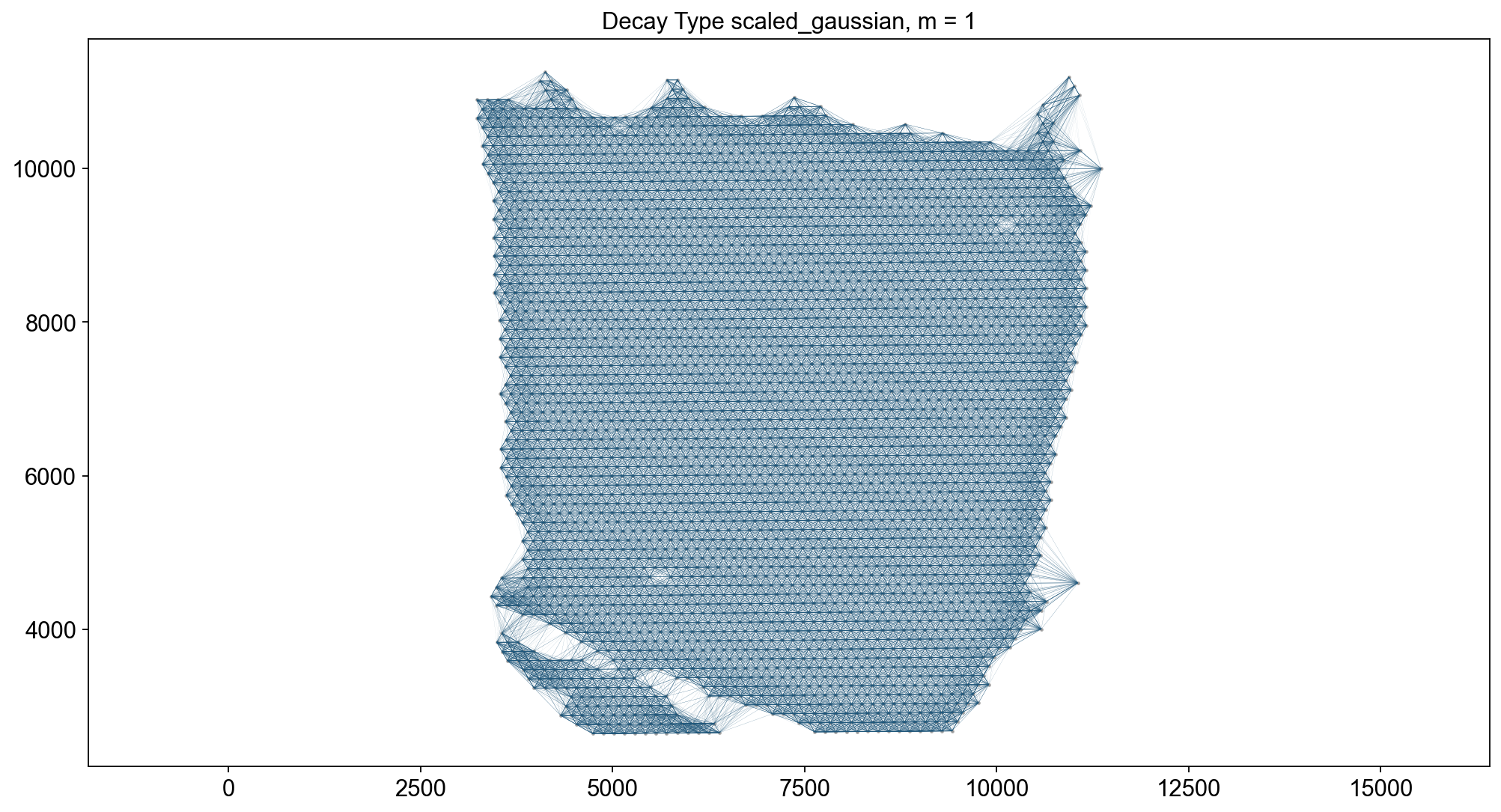
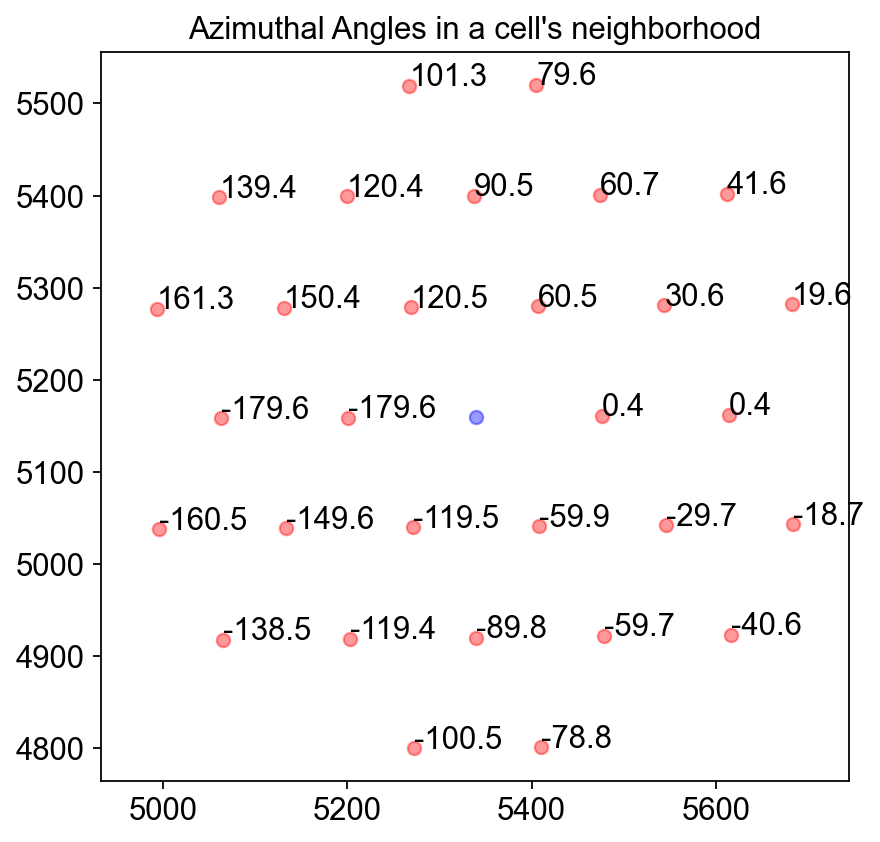
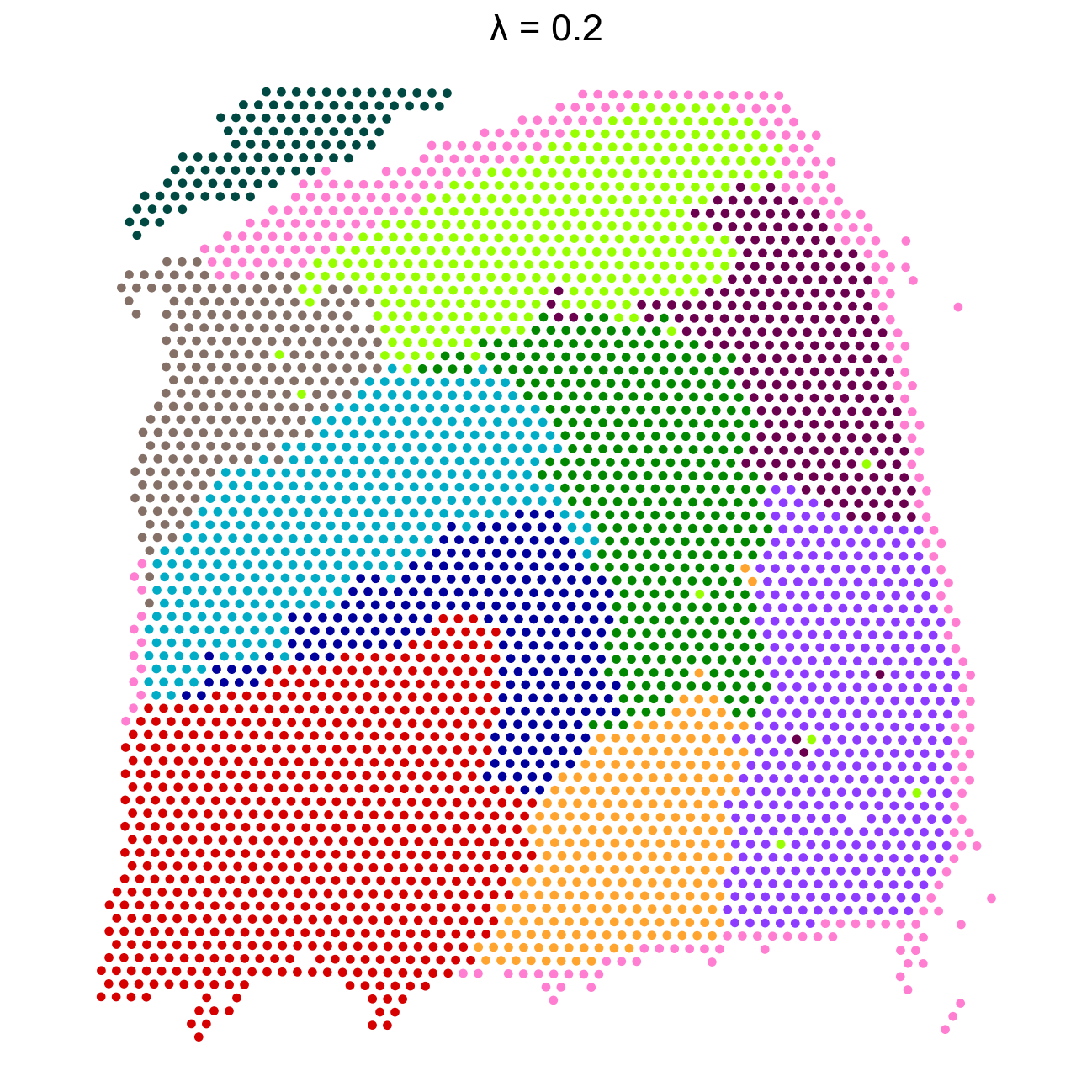
adata.obsm['X_banksy']=adata.obsm['X_banksy_scaled_gaussian_pc20_nc0.20_r0.80']
ov.utils.cluster(adata,use_rep='X_banksy',method='mclust',n_components=10, modelNames='EEV', random_state=42, )adata.obs['mclust_banksy'] = ov.utils.refine_label(adata, radius=50, key='mclust') adata.obs['mclust_banksy']=adata.obs['mclust_banksy'].astype('category')
running GaussianMixture clustering
finished: found 10 clusters and added
    'mclust', the cluster labels (adata.obs, categorical)
sc.pl.spatial(adata, color=['mclust_banksy','mclust','Ground Truth'] )
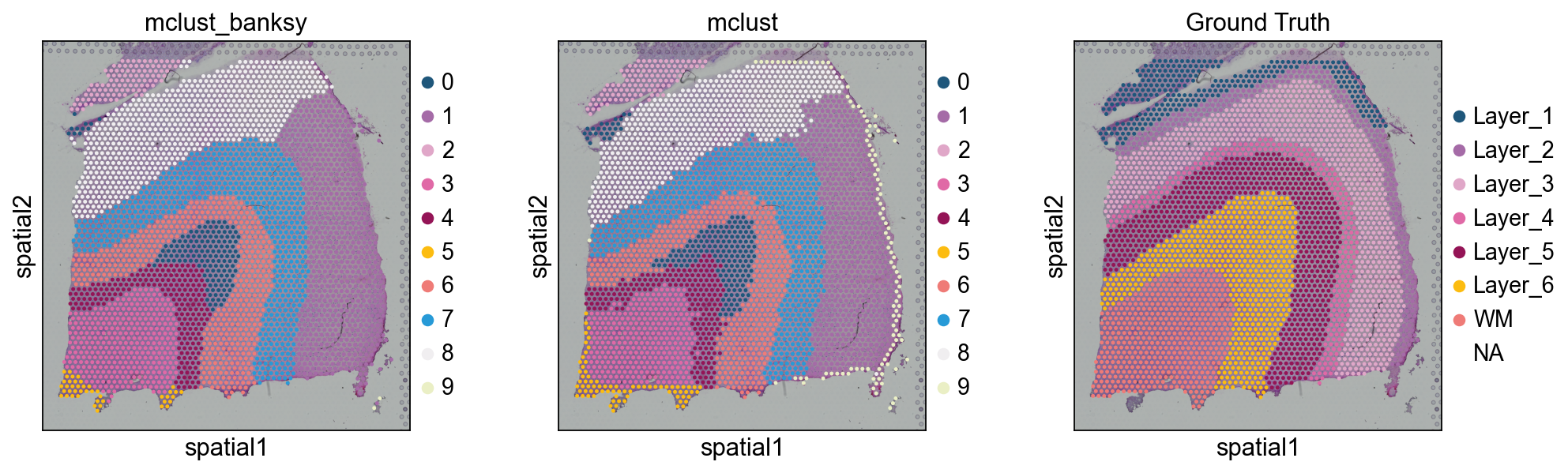
评估 clusterWe use ARI 到 评估 该 scoring 的 our clusters against 该 true valuesWhile it appears 那 STAGATE works best, note 那 此 is only 在 此 数据集.- 如果 your 数据 is 点位-level resolution, GraphST, BINARY 和 STAGATE would be 好的 algorithms 到 use- BINARY 和 CAST would be 好的 algorithms 如果 your 数据 is NanoString 或 other 单细胞 resolution#
from sklearn.metrics.cluster import adjusted_rand_scoreobs_df = adata.obs.dropna()# GraphSTARI = adjusted_rand_score(obs_df['mclust_GraphST'], obs_df['Ground Truth'])print('mclust_GraphST: Adjusted rand index = %.2f' %ARI)ARI = adjusted_rand_score(obs_df['mclust_R_GraphST'], obs_df['Ground Truth'])print('mclust_R_GraphST: Adjusted rand index = %.2f' %ARI)ARI = adjusted_rand_score(obs_df['mclust_R_STAGATE'], obs_df['Ground Truth'])print('mclust_STAGATE: Adjusted rand index = %.2f' %ARI)ARI = adjusted_rand_score(obs_df['mclust_BINARY'], obs_df['Ground Truth'])print('mclust_BINARY: Adjusted rand index = %.2f' %ARI)ARI = adjusted_rand_score(obs_df['mclustpy_BINARY'], obs_df['Ground Truth'])print('mclustpy_BINARY: Adjusted rand index = %.2f' %ARI)ARI = adjusted_rand_score(obs_df['mclust_CAST'], obs_df['Ground Truth'])print('mclust_CAST: Adjusted rand index = %.2f' %ARI)
mclust_GraphST: Adjusted rand index = 0.37
mclust_R_GraphST: Adjusted rand index = 0.42
mclust_STAGATE: Adjusted rand index = 0.53
mclust_BINARY: Adjusted rand index = 0.47
mclustpy_BINARY: Adjusted rand index = 0.43
mclust_CAST: Adjusted rand index = 0.40
from sklearn.metrics.cluster import adjusted_rand_scoreobs_df = adata.obs.dropna()ARI = adjusted_rand_score(obs_df['mclust_banksy'], obs_df['Ground Truth'])print('mclust_banksy: Adjusted rand index = %.2f' %ARI)
mclust_banksy: Adjusted rand index = 0.46