
Ctrl+K
omicverse - Home
  • OmicVerse Documentation
  • OmicVerse Installation Guide
  • Tutorials
    • Genomics
      • GWAS pipeline 1 — From genotypes to a fine-mapped locus
      • GWAS pipeline 2 — From a GWAS hit to a mechanism
      • GWAS pipeline 3 — Spatially Resolved GWAS Mapping
    • Bulk Transcriptomics
      • Upstream
        • Bulk RNA-seq mapping with STAR
        • Bulk RNA-seq mapping with kb-python
      • Preprocessing
        • Batch correction in Bulk RNA-seq or microarray data
      • Downstream
        • Different Expression Analysis
        • Different Expression Analysis with DEseq2
        • Bulk RNA-seq time-course analysis
        • Protein-Protein interaction (PPI) analysis by String-db
        • WGCNA (Weighted gene co-expression network analysis) analysis
      • Deconvolution
        • Bulk deconvolution with reference scRNA-seq
      • Others
        • TCGA database preprocess
    • Single-Cell Transcriptomics
      • Alignment
        • Alignment and analysis of single-cell RNA-seq data
        • scRNA-seq preprocessing with kb-python (kallisto | bustools)
        • Benchmarking the simpleaf and kb-python alignment backends
        • Alignment and RNA velocity analysis of single-cell RNA-seq data.
      • Preprocessing
        • Preprocessing the data of scRNA-seq with omicverse[CPU-GPU-mixed]
        • Preprocessing the data of scRNA-seq with omicverse[GPU]
        • Preprocessing the data of scRNA-seq [Rust / out-of-memory]
        • Removing ambient / contamination RNA from droplet scRNA-seq
        • Clustering space
        • GeneModule Identified
        • Lazy analysis of scRNA-seq
      • Batch correction
        • Batch correction and data integration
        • Data integration and batch correction
        • Batch-correction — backend zoo
      • Annotation
        • Reference-free automated single-cell cell type annotation
        • Reference automated single-cell cell type annotation
        • Consensus annotation with CellVote — PBMC3k
        • Mapping Cell Names to the Cell Ontology/Taxonomy
        • Individual methods
      • MetaCell
        • MetaCell
        • Recommended workflow: SEACells end-to-end + downstream sanity
        • Multi-sample metacells with batch correction
        • MetaCell zoo
        • SEACells — kernel archetypal analysis
        • MetaQ — VQ-VAE codebook metacells
        • SuperCell — kNN graph + walktrap community detection
        • k-means — the trivial baseline that’s often hard to beat
        • random — the honest lower-bound baseline
        • GeoSketch — density-aware sketching as a metacell baseline
        • Side-by-side comparison of all metacell backends
      • Trajectory
        • Trajectory inference
        • Trajectory Inference with Slingshot
        • Unified terminal-state & fate-probability inference
        • Trajectory inference — backend zoo
        • Timing-associated genes analysis with TimeFateKernel
        • Identify the driver regulators of cell fate decisions
      • In-silico Perturbation
        • In-silico gene perturbation
        • In-silico perturbation with scTenifoldKnk (backend='sctenifoldknk')
        • In-silico perturbation with CellOracle (backend='cell_oracle')
        • Unified downstream analysis for ov.single.perturb
      • Cell-Cell Communication
        • Cell-cell communication analysis with CellPhoneDB
        • Cell-cell communication analysis with LIANA+
      • Cell Structure
        • Differential expression and celltype analysis [All Cell]
        • Differential expression analysis [Meta Cell]
        • Gene Regulatory Network Analysis with SCENIC
        • Drug response predict with scDrug
        • Data integration and batch correction with SIMBA
      • Copy-Number Variation
        • Single-cell copy-number variation with CopyKAT
        • Single-cell copy-number variation with inferCNV
      • Metabolism
        • Single-cell metabolic landscape of a head & neck tumour
        • Metabolite cell-cell communication in a tumour microenvironment
      • Enrichment
        • Pathway analysis with AUCell
        • Comparing enrichment-score methods on scRNA-seq
      • Velocity
        • Velocity Basic Calculation
        • Velocity Optimization
        • RNA velocity and regulatory perturbation analysis with RegVelo
        • Run RegVelo with inferred GRN
        • Velocity-guided CellRank Analysis
      • Multi-omics
        • Multi omics analysis by MOFA
        • Multi omics analysis by MOFA and GLUE
        • Celltype annotation transfer in multi-omics
      • Single-EV proteomics
        • Single-extracellular-vesicle (single-EV) proteomics
    • Spatial Transcriptomics
      • Preprocessing
        • Crop and Rotation of spatial transcriptomic data
        • Cell Segmentation (10x HD)
        • Analyze NanoString data
        • Analyze Xenium data
        • Analyze 10x Atera (WTA Preview) FFPE breast cancer data
        • Analyze Visium HD data
        • Spatial integration and clustering
      • Clustering
        • Spatial clustering with GraphST + pymclustR
        • Spatial clustering with BINARY + pymclustR
        • Spatial clustering with STAGATE + pymclustR
        • Spatial clustering with CAST + pymclustR
        • Spatial clustering with BANKSY + pymclustR
      • Deconvolution
        • Identifying Pseudo-Spatial Map
        • Spatial deconvolution with reference scRNA-seq
        • Spatial deconvolution with RCTD
        • FlashDeconv: Fast Spatial Deconvolution via Structure-Preserving Sketching
        • Spatial deconvolution without reference scRNA-seq
      • H&E → spatial transcriptomics prediction (HE-zoo)
        • HEST-FM — pathology foundation model + ridge head
        • STPath — zero-shot generative foundation model
        • STFlow — per-slide flow-matching denoiser
        • iStar — super-resolve a paired Visium + H&E sample
      • Downstream
        • Spatial transition tensor of single cells
        • Spatial Communication
        • Spatial IsoDepth Calculation
        • Single cell spatial alignment tools
    • Immune Repertoire
      • Single-cell TCR + transcriptome — the immune-repertoire pipeline
      • Bulk TCR immune-repertoire analysis with ov.airr
      • B-cell receptor repertoire analysis with ov.airr
      • Single-cell BCR + transcriptome — clonal expansion, isotypes and somatic hypermutation
      • TCR specificity analysis — grouping receptors by their antigen
      • Joint single-cell TCR + gene-expression analysis — a CoNGA-style workflow
    • Proteomics
      • Bulk LC-MS/MS proteomics — the best-practice pipeline
      • Missing values in proteomics — diagnosis & imputation
      • Peptide → protein summarization & the DIA workflow
      • Differential expression in proteomics: a benchmark with ground truth
      • Olink NPX — affinity proteomics analysis
    • Structure & Docking
      • Protein structure of an omics target — fetch, visualize, and assess before you trust
      • Is the target druggable? — binding pockets and known drugs
      • Molecular docking — validate the protocol, then dock the candidate
    • Metabolomics
      • Metabolomics preprocessing and univariate statistics
      • Multivariate discrimination with PLS-DA and OPLS-DA
      • Metabolite-set enrichment analysis (MSEA)
      • Untargeted LC-MS and mummichog pathway inference
      • Lipidomics — the lipidr workflow in omicverse
      • Batch effect and drift correction for LC-MS
      • Multi-factor designs — ASCA and linear mixed models
      • Biomarker discovery — univariate AUC + multivariate panel
      • Differential correlation — DGCA
      • Multi-omics integration — metabolomics + RNA-seq with MOFA
      • Real-data case study — MTBLS1 (urine NMR, Type 2 Diabetes)
    • Epigenetics
      • scATAC-seq preprocessing and quality control
      • scATAC clustering, annotation and gene activity
      • Transcription-factor motif activity with chromVAR
      • Peak-to-gene linkage (multiome)
      • Marker peaks and differential accessibility
      • scRNA–scATAC integration and label transfer
      • Bulk Hi-C — contact maps, compartments and TADs
      • Single-cell Hi-C — imputation and cell-cycle embedding
      • Bulk ChIP-seq upstream: FASTQ → peaks
      • Bulk ATAC footprinting — TF activity from Tn5 cut profiles
    • Microbiome
      • 16S rRNA amplicon analysis with OmicVerse
      • 16S phylogeny: MAFFT → FastTree → Faith PD + UniFrac
      • DADA2 backend: pure-Python ASV inference
      • Differential abundance: Wilcoxon vs DESeq2 vs ANCOM-BC
      • Cross-cohort 16S meta-analysis
    • Multi-Omics
      • Bulk RNA-seq generate ‘interrupted’ cells to interpolate scRNA-seq
      • Bulk RNA-seq to Single RNA-seq
      • Single RNA-seq to Spatial RNA-seq
      • Paired microbe ↔ metabolite integration (Franzosa 2019 IBD)
    • Foundation Models
      • Overview
      • Skill-Ready Models
        • scGPT
        • GeneFormer
        • UCE
        • scFoundation
        • CellPLM
      • Core Models
      • Specialized Models
      • Domain-Specific Models
    • Visualization
      • Visualization of single cell RNA-seq
      • Visualization of Bulk RNA-seq
      • Palette optimization for publication-quality single-cell & spatial plots
      • Scientific plotting for publication with OmicVerse
      • Color system
      • Circular UMAP with plot1cell
      • Funky heatmaps for benchmark / multi-metric tables
  • OmicClaw
    • Gateway and Channels
      • OmicClaw Gateway Overview
      • OmicClaw Setup and Auth
      • OmicClaw Telegram Tutorial
      • OmicClaw Feishu 教程
      • OmicClaw iMessage Tutorial
      • OmicClaw QQ Tutorial
      • OmicClaw Session Workflow
      • OmicClaw Troubleshooting
    • MCP Server
      • OmicVerse MCP Server
      • OmicVerse MCP Quick Start
      • OmicVerse MCP Full Start
      • OmicVerse MCP Tool Catalog
      • OmicVerse MCP Clients and Deployment
      • OmicVerse MCP Runtime and Troubleshooting
      • OmicVerse MCP Reference
      • Using OmicVerse MCP with Claude Code — Step by Step
    • General Notebooks
      • J.A.R.V.I.S. with PBMC3k
      • J.A.R.V.I.S. with Ten-Task Suite
  • API Reference
    • User API
      • omicverse.generate_reference_table
      • omicverse.settings.cpu_gpu_mixed_init
      • omicverse.settings.gpu_init
      • omicverse.io.load
      • omicverse.io.read
      • omicverse.io.read_10x_h5
      • omicverse.io.read_10x_mtx
      • omicverse.io.read_csv
      • omicverse.io.read_h5ad
      • omicverse.io.read_nanostring
      • omicverse.io.read_visium_hd
      • omicverse.io.read_visium_hd_bin
      • omicverse.io.read_visium_hd_seg
      • omicverse.io.read_xenium
      • omicverse.io.save
      • omicverse.io.spatial.read_visium
      • omicverse.io.spatial.write_visium_hd_cellseg
      • omicverse.alignment.amplicon_16s_pipeline
      • omicverse.alignment.build_amplicon_anndata
      • omicverse.alignment.build_phylogeny
      • omicverse.alignment.bulk_rnaseq_pipeline
      • omicverse.alignment.count
      • omicverse.alignment.cutadapt
      • omicverse.alignment.dada2_pipeline
      • omicverse.alignment.dada2.denoise
      • omicverse.alignment.vsearch.dereplicate
      • omicverse.alignment.fastp
      • omicverse.alignment.fasttree
      • omicverse.alignment.featureCount
      • omicverse.alignment.fetch_rdp
      • omicverse.alignment.fetch_silva
      • omicverse.alignment.fetch_sintax_ref
      • omicverse.alignment.dada2.filter_and_trim
      • omicverse.alignment.vsearch.filter_quality
      • omicverse.alignment.fqdump
      • omicverse.alignment.dada2.learn_errors
      • omicverse.alignment.mafft
      • omicverse.alignment.dada2.make_seqtab
      • omicverse.alignment.dada2.merge_pairs
      • omicverse.alignment.parallel_fastq_dump
      • omicverse.alignment.prefetch
      • omicverse.alignment.ref
      • omicverse.alignment.dada2.remove_chimeras
      • omicverse.alignment.vsearch.sintax
      • omicverse.alignment.STAR
      • omicverse.alignment.vsearch.uchime3_denovo
      • omicverse.alignment.vsearch.unoise3
      • omicverse.alignment.vsearch.usearch_global
      • omicverse.pp.anndata_to_CPU
      • omicverse.pp.anndata_to_GPU
      • omicverse.pp.binary_search
      • omicverse.pp.champ
      • omicverse.pp.filter_cells
      • omicverse.pp.filter_genes
      • omicverse.pp.highly_variable_features
      • omicverse.pp.highly_variable_genes
      • omicverse.pp.identify_robust_genes
      • omicverse.pp.leiden
      • omicverse.pp.log1p
      • omicverse.pp.louvain
      • omicverse.pp.mde
      • omicverse.pp.neighbors
      • omicverse.pp.normalize_pearson_residuals
      • omicverse.pp.pca
      • omicverse.pp.preprocess
      • omicverse.pp.qc
      • omicverse.pp.recover_counts
      • omicverse.pp.regress
      • omicverse.pp.regress_and_scale
      • omicverse.pp.remove_cc_genes
      • omicverse.pp.scale
      • omicverse.pp.score_genes_cell_cycle
      • omicverse.pp.scrublet
      • omicverse.pp.scrublet_simulate_doublets
      • omicverse.pp.select_hvf_pegasus
      • omicverse.pp.sude
      • omicverse.pp.tsne
      • omicverse.pp.umap
      • omicverse.single.Annotation
      • omicverse.single.AnnotationRef
      • omicverse.single.auto_resolution
      • omicverse.single.autoResolution
      • omicverse.single.batch_correction
      • omicverse.single.CellOntologyMapper
      • omicverse.single.CellVote
      • omicverse.single.cNMF
      • omicverse.single.convert_human_to_mouse_network
      • omicverse.single.cosg
      • omicverse.single.cytotrace2
      • omicverse.single.DCT
      • omicverse.single.DEG
      • omicverse.single.download_cellphonedb_database
      • omicverse.single.download_cl
      • omicverse.single.Drug_Response
      • omicverse.single.dynamic_features
      • omicverse.single.factor_correlation
      • omicverse.single.factor_exact
      • omicverse.single.Fate
      • omicverse.single.find_markers
      • omicverse.single.format_liana_results
      • omicverse.single.gene_trends
      • omicverse.single.generate_scRNA_report
      • omicverse.single.geneset_aucell
      • omicverse.single.get_celltype_marker
      • omicverse.single.get_cluster_celltype
      • omicverse.single.get_markers
      • omicverse.single.get_obs_value
      • omicverse.single.get_weights
      • omicverse.single.GLUE_pair
      • omicverse.single.gptcelltype
      • omicverse.single.gptcelltype_local
      • omicverse.single.hematopoiesis
      • omicverse.single.lazy
      • omicverse.single.load_human_prior_interaction_network
      • omicverse.single.MetaCell
      • omicverse.single.MetaTiME
      • omicverse.single.Monocle
      • omicverse.single.mouse_hsc_nestorowa16
      • omicverse.single.pathway_aucell
      • omicverse.single.pathway_aucell_enrichment
      • omicverse.single.pathway_enrichment
      • omicverse.single.pathway_enrichment_plot
      • omicverse.single.plot_metacells
      • omicverse.single.pyCEFCON
      • omicverse.single.pyMOFA
      • omicverse.single.pyMOFAART
      • omicverse.single.pySCSA
      • omicverse.single.pySIMBA
      • omicverse.single.pyTOSICA
      • omicverse.single.pyVIA
      • omicverse.single.run_cellphonedb_v5
      • omicverse.single.run_liana
      • omicverse.single.scanpy_cellanno_from_dict
      • omicverse.single.SCENIC
      • omicverse.single.TrajInfer
      • omicverse.single.Velo
      • omicverse.bulk.batch_correction
      • omicverse.bulk.Deconvolution
      • omicverse.bulk.geneset_enrichment
      • omicverse.bulk.geneset_plot
      • omicverse.bulk.geneset_plot_multi
      • omicverse.bulk.Matrix_ID_mapping
      • omicverse.bulk.pyDEG
      • omicverse.bulk.pyGSEA
      • omicverse.bulk.pyPPI
      • omicverse.bulk.pyTCGA
      • omicverse.bulk.pyWGCNA
      • omicverse.bulk.readWGCNA
      • omicverse.bulk.string_interaction
      • omicverse.metabol.aggregate_by_class
      • omicverse.metabol.annotate_lipids
      • omicverse.metabol.annotate_peaks
      • omicverse.metabol.anova
      • omicverse.metabol.asca
      • omicverse.metabol.asca_variance_bar
      • omicverse.metabol.biomarker_panel
      • omicverse.metabol.blank_filter
      • omicverse.metabol.corr_network
      • omicverse.metabol.corr_network_plot
      • omicverse.metabol.cv_filter
      • omicverse.metabol.dgca
      • omicverse.metabol.dgca_class_bar
      • omicverse.metabol.differential
      • omicverse.metabol.drift_correct
      • omicverse.metabol.fetch_chebi_compounds
      • omicverse.metabol.fetch_hmdb_from_name
      • omicverse.metabol.fetch_kegg_pathways
      • omicverse.metabol.fetch_lion_associations
      • omicverse.metabol.impute
      • omicverse.metabol.lion_enrichment
      • omicverse.metabol.load_pathways
      • omicverse.metabol.map_ids
      • omicverse.metabol.meba
      • omicverse.metabol.mixed_model
      • omicverse.metabol.msea_gsea
      • omicverse.metabol.msea_ora
      • omicverse.metabol.mummichog_basic
      • omicverse.metabol.normalize
      • omicverse.metabol.opls_da
      • omicverse.metabol.parse_lipid
      • omicverse.metabol.pathway_bar
      • omicverse.metabol.pathway_dot
      • omicverse.metabol.plsda
      • omicverse.metabol.pyMetabo
      • omicverse.metabol.read_lcms
      • omicverse.metabol.read_metaboanalyst
      • omicverse.metabol.read_wide
      • omicverse.metabol.roc_feature
      • omicverse.metabol.run_mofa
      • omicverse.metabol.s_plot
      • omicverse.metabol.sample_qc
      • omicverse.metabol.sample_qc_plot
      • omicverse.metabol.serrf
      • omicverse.metabol.pyMetabo.significant_metabolites
      • omicverse.metabol.transform
      • omicverse.metabol.vip_bar
      • omicverse.metabol.pyMetabo.vip_table
      • omicverse.metabol.volcano
      • omicverse.micro.Alpha
      • omicverse.micro.DA.ancombc
      • omicverse.micro.attach_tree
      • omicverse.micro.Beta
      • omicverse.micro.Beta.braycurtis
      • omicverse.micro.clr
      • omicverse.micro.collapse_taxa
      • omicverse.micro.combine_studies
      • omicverse.micro.MMvec.conditional_probabilities
      • omicverse.micro.MMvec.cooccurrence
      • omicverse.micro.DA
      • omicverse.micro.DA.deseq2
      • omicverse.micro.fetch_franzosa_ibd_2019
      • omicverse.micro.filter_by_prevalence
      • omicverse.micro.MMvec.fit
      • omicverse.micro.ilr
      • omicverse.micro.meta_da
      • omicverse.micro.MMvec
      • omicverse.micro.Ordinate.nmds
      • omicverse.micro.Alpha.observed
      • omicverse.micro.Ordinate
      • omicverse.micro.paired_cca
      • omicverse.micro.paired_spearman
      • omicverse.micro.Ordinate.pcoa
      • omicverse.micro.plot_embedding_biplot
      • omicverse.micro.plot_mmvec_training
      • omicverse.micro.Ordinate.proportion_explained
      • omicverse.micro.rarefy
      • omicverse.micro.Alpha.run
      • omicverse.micro.Alpha.shannon
      • omicverse.micro.simulate_paired
      • omicverse.micro.MMvec.top_pairs
      • omicverse.micro.DA.wilcoxon
      • omicverse.space.bin2cell
      • omicverse.space.Cal_Spatial_Net
      • omicverse.space.calculate_gene_signature
      • omicverse.space.CAST
      • omicverse.space.cellcharter
      • omicverse.space.CellLoc
      • omicverse.space.CellMap
      • omicverse.space.clusters
      • omicverse.space.create_communication_anndata
      • omicverse.space.crop_space_visium
      • omicverse.space.Deconvolution
      • omicverse.space.GASTON
      • omicverse.space.map_spatial_auto
      • omicverse.space.map_spatial_manual
      • omicverse.space.merge_cluster
      • omicverse.space.moranI
      • omicverse.space.nmf_tissue_zones
      • omicverse.space.pySpaceFlow
      • omicverse.space.pySTAGATE
      • omicverse.space.pySTAligner
      • omicverse.space.read_visium_10x
      • omicverse.space.rotate_space_visium
      • omicverse.space.salvage_secondary_labels
      • omicverse.space.spatial_autocorr
      • omicverse.space.spatial_neighbors
      • omicverse.space.STT
      • omicverse.space.svg
      • omicverse.space.sync_visium_hd_seg_geometries
      • omicverse.space.Tangram
      • omicverse.space.update_classification_from_database
      • omicverse.space.visium_10x_hd_cellpose_expand
      • omicverse.space.visium_10x_hd_cellpose_gex
      • omicverse.space.visium_10x_hd_cellpose_he
      • omicverse.bulk2single.Bulk2Single
      • omicverse.bulk2single.bulk2single_plot_cellprop
      • omicverse.bulk2single.bulk2single_plot_correlation
      • omicverse.bulk2single.BulkTrajBlend
      • omicverse.bulk2single.Single2Spatial
      • omicverse.pl.add_density_contour
      • omicverse.pl.add_palue
      • omicverse.pl.add_pie2spatial
      • omicverse.pl.add_streamplot
      • omicverse.pl.branch_streamplot
      • omicverse.pl.bardotplot
      • omicverse.pl.boxplot
      • omicverse.pl.branch_streamplot
      • omicverse.pl.calculate_gene_density
      • omicverse.pl.ccc_heatmap
      • omicverse.pl.ccc_network_plot
      • omicverse.pl.ccc_stat_plot
      • omicverse.pl.cell_cor_heatmap
      • omicverse.pl.CellChatViz
      • omicverse.pl.cellproportion
      • omicverse.pl.complexheatmap
      • omicverse.pl.contour
      • omicverse.pl.ConvexHull
      • omicverse.pl.create_custom_colormap
      • omicverse.pl.dotplot
      • omicverse.pl.dynamic_heatmap
      • omicverse.pl.dynamic_trends
      • omicverse.pl.embedding
      • omicverse.pl.embedding_adjust
      • omicverse.pl.embedding_atlas
      • omicverse.pl.embedding_celltype
      • omicverse.pl.embedding_density
      • omicverse.pl.feature_heatmap
      • omicverse.pl.ForbiddenCity
      • omicverse.pl.gen_mpl_labels
      • omicverse.pl.geneset_wordcloud
      • omicverse.pl.group_heatmap
      • omicverse.pl.marker_heatmap
      • omicverse.pl.markers_dotplot
      • omicverse.pl.palette
      • omicverse.pl.plot1cell
      • omicverse.pl.plot_cellproportion
      • omicverse.pl.plot_embedding_celltype
      • omicverse.pl.plot_flowsig_network
      • omicverse.pl.plot_grouped_fractions
      • omicverse.pl.plot_pca_variance_ratio
      • omicverse.pl.plot_set
      • omicverse.pl.plot_spatial
      • omicverse.pl.plot_text_set
      • omicverse.pl.rank_genes_groups_dotplot
      • omicverse.pl.single_group_boxplot
      • omicverse.pl.tsne
      • omicverse.pl.umap
      • omicverse.pl.venn
      • omicverse.pl.violin
      • omicverse.pl.volcano
      • omicverse.datasets.bhattacherjee
      • omicverse.datasets.blobs
      • omicverse.datasets.bm
      • omicverse.datasets.bone_marrow
      • omicverse.datasets.burczynski06
      • omicverse.datasets.chromaffin
      • omicverse.datasets.cite_seq
      • omicverse.datasets.create_mock_dataset
      • omicverse.datasets.decov_bulk_covid_bulk
      • omicverse.datasets.decov_bulk_covid_single
      • omicverse.datasets.dentate_gyrus
      • omicverse.datasets.dentate_gyrus_scvelo
      • omicverse.datasets.download_data
      • omicverse.datasets.download_data_requests
      • omicverse.datasets.get_adata
      • omicverse.datasets.gillespie
      • omicverse.datasets.haber
      • omicverse.datasets.hematopoiesis
      • omicverse.datasets.hematopoiesis_raw
      • omicverse.datasets.hg_forebrain_glutamatergic
      • omicverse.datasets.hl60
      • omicverse.datasets.human_tfs
      • omicverse.datasets.krumsiek11
      • omicverse.datasets.moignard15
      • omicverse.datasets.multi_brain_5k
      • omicverse.datasets.nascseq
      • omicverse.datasets.pancreas_cellrank
      • omicverse.datasets.pancreatic_endocrinogenesis
      • omicverse.datasets.paul15
      • omicverse.datasets.pbmc3k
      • omicverse.datasets.pbmc8k
      • omicverse.datasets.sc_ref_Lymph_Node
      • omicverse.datasets.sceu_seq_organoid
      • omicverse.datasets.sceu_seq_rpe1
      • omicverse.datasets.scifate
      • omicverse.datasets.scnt_seq_neuron_labeling
      • omicverse.datasets.scnt_seq_neuron_splicing
      • omicverse.datasets.scslamseq
      • omicverse.datasets.seqfish
      • omicverse.datasets.toggleswitch
      • omicverse.datasets.zebrafish
      • omicverse.external.GraphST
      • omicverse.utils.biocontext.call_tool
      • omicverse.utils.biocontext.get_ensembl_id
      • omicverse.utils.biocontext.get_fulltext
      • omicverse.utils.biocontext.get_uniprot_id
      • omicverse.utils.biocontext.list_tools
      • omicverse.utils.biocontext.query_alphafold
      • omicverse.utils.biocontext.query_cell_ontology
      • omicverse.utils.biocontext.query_chebi
      • omicverse.utils.biocontext.query_efo
      • omicverse.utils.biocontext.query_go
      • omicverse.utils.biocontext.query_hpa
      • omicverse.utils.biocontext.query_interpro
      • omicverse.utils.biocontext.query_opentargets
      • omicverse.utils.biocontext.query_panglaodb
      • omicverse.utils.biocontext.query_reactome
      • omicverse.utils.biocontext.query_string
      • omicverse.utils.biocontext.query_uniprot
      • omicverse.utils.biocontext.search_clinical_trials
      • omicverse.utils.biocontext.search_drugs
      • omicverse.utils.biocontext.search_interpro
      • omicverse.utils.biocontext.search_literature
      • omicverse.utils.biocontext.search_preprints
      • omicverse.utils.biocontext.search_pride
      • omicverse.utils.cal_paga
      • omicverse.utils.cluster
      • omicverse.utils.convert2gene_id
      • omicverse.utils.convert2gene_symbol
      • omicverse.utils.convert2symbol
      • omicverse.utils.convert_adata_for_rust
      • omicverse.utils.convert_to_pandas
      • omicverse.utils.download_CaDRReS_model
      • omicverse.utils.download_GDSC_data
      • omicverse.utils.download_geneid_annotation_pair
      • omicverse.utils.download_pathway_database
      • omicverse.utils.download_tosica_gmt
      • omicverse.utils.geneset_prepare
      • omicverse.utils.get_gene_annotation
      • omicverse.utils.gtf_to_pair_tsv
      • omicverse.utils.LDA_topic
      • omicverse.utils.load_metabolights
      • omicverse.utils.mde
      • omicverse.utils.plot_paga
      • omicverse.utils.refine_label
      • omicverse.utils.retrieve_layers
      • omicverse.utils.roe
      • omicverse.utils.store_layers
      • omicverse.utils.symbol2id
      • omicverse.utils.weighted_knn_trainer
      • omicverse.utils.weighted_knn_transfer
      • omicverse.utils.wrap_dataframe
  • Release Notes
  • Developer guild
  • Registered Functions — GPU Support Overview
  • Discussion
  • GitHub
  • Repository
  • Show source
  • Suggest edit
  • Open issue
  • .ipynb

Olink NPX — affinity proteomics analysis

Contents

  • How affinity proteomics differs from mass spectrometry
  • Why it matters
  • 0. Imports
  • 1. Load NPX data
  • 2. Quality control
  • 3. Bridge / batch normalization
  • 4. Pivot to AnnData & explore
  • 5. Differential expression
  • 6. Visualization
  • 7. Pathway enrichment
  • Summary

Olink NPX — affinity proteomics analysis#

Olink is an affinity (antibody-based) proteomics platform built on the Proximity Extension Assay (PEA). Each protein is detected by a pair of antibodies, each carrying a unique DNA oligo; when both antibodies bind the same target, the oligos hybridize, are extended by polymerase, and the resulting amplicon is quantified by qPCR or next-generation sequencing (Olink Explore). The readout is NPX — Normalized Protein eXpression, a relative abundance unit on an arbitrary log2 scale.

How affinity proteomics differs from mass spectrometry#

Aspect

LC-MS/MS (discovery)

Olink PEA (affinity)

Targets

Whole detectable proteome, unbiased

Pre-defined antibody panels (≤ a few thousand proteins)

Quantity

Peptide intensities → protein summarization

Direct per-protein NPX, already on log2 scale

Missingness

High, often MNAR → needs imputation

Low — every assay measured in every sample

Batch effects

Run drift, normalization on intensities

Plate effects → bridge normalization across batches

Dynamic range

Wide, abundance-dependent

Excellent low-abundance sensitivity (cytokines, etc.)

Why it matters#

Because PEA is sensitive, reproducible, and cheap per sample, it scales to population proteomics: the UK Biobank Pharma Proteomics Project (UKB-PPP) profiled ~3,000 plasma proteins in ~54,000 participants with Olink Explore. Multi-plate, multi-site studies at this scale make QC and bridge normalization central to the workflow.

This tutorial runs the complete OlinkAnalyze workflow on a real Olink Explore dataset (npx_data1 from the OlinkAnalyze R package) using omicverse’s ov.protein module and the standalone pyolinkanalyze package. NPX data is long-format, so most pyolinkanalyze functions operate directly on the long DataFrame, while ov.protein works on a pivoted samples × proteins AnnData.

0. Imports#

import omicverse as ov
import pyolinkanalyze as poa
import numpy as np
import pandas as pd
import anndata as adt
import matplotlib.pyplot as plt

1. Load NPX data#

ov.datasets.protein_olink() returns the real OlinkAnalyze example dataset npx_data1 as a long-format pandas DataFrame. Long format means one row per (sample, protein) measurement — not a sample × protein matrix. This is the native shape Olink delivers and the shape every pyolinkanalyze statistical function expects.

npx = ov.datasets.protein_olink()
print('shape:', npx.shape)
npx.head()
🔍 Downloading data to ./data/protein_olink_npx.csv.gz
⚠️ File ./data/protein_olink_npx.csv.gz already exists
shape: (29440, 17)
SampleID Index OlinkID UniProt Assay MissingFreq Panel_Version PlateID QC_Warning LOD NPX Subject Treatment Site Time Project Panel
0 A1 1 OID01216 O00533 CHL1 0.01875 v.1201 Example_Data_1_CAM.csv Pass 2.368467 12.956143 ID1 Untreated Site_D Baseline data1 Olink Cardiometabolic
1 A2 2 OID01216 O00533 CHL1 0.01875 v.1201 Example_Data_1_CAM.csv Pass 2.368467 11.269477 ID1 Untreated Site_D Week.6 data1 Olink Cardiometabolic
2 A3 3 OID01216 O00533 CHL1 0.01875 v.1201 Example_Data_1_CAM.csv Pass 2.368467 25.451070 ID1 Untreated Site_D Week.12 data1 Olink Cardiometabolic
3 A4 4 OID01216 O00533 CHL1 0.01875 v.1201 Example_Data_1_CAM.csv Pass 2.368467 14.453038 ID2 Untreated Site_C Baseline data1 Olink Cardiometabolic
4 A5 5 OID01216 O00533 CHL1 0.01875 v.1201 Example_Data_1_CAM.csv Pass 2.368467 7.628712 ID2 Untreated Site_C Week.6 data1 Olink Cardiometabolic
# Key long-format columns
print('columns:', list(npx.columns))
print('n unique assays (proteins):', npx['Assay'].nunique())
print('n unique samples         :', npx['SampleID'].nunique())
columns: ['SampleID', 'Index', 'OlinkID', 'UniProt', 'Assay', 'MissingFreq', 'Panel_Version', 'PlateID', 'QC_Warning', 'LOD', 'NPX', 'Subject', 'Treatment', 'Site', 'Time', 'Project', 'Panel']
n unique assays (proteins): 184
n unique samples         : 158
# Study design: group variable, sites, panels, plates
print('Treatment groups:'); print(npx['Treatment'].value_counts(dropna=False))
print('\nSites :', sorted(npx['Site'].dropna().unique()))
print('Panels:', list(npx['Panel'].unique()))
print('Plates:', npx['PlateID'].nunique(), '|', 'Timepoints:', list(npx['Time'].dropna().unique()))
Treatment groups:
Treatment
Untreated    16008
Treated      12696
NaN            736
Name: count, dtype: int64

Sites : ['Site_A', 'Site_B', 'Site_C', 'Site_D', 'Site_E']
Panels: ['Olink Cardiometabolic', 'Olink Inflammation']
Plates: 4 | Timepoints: ['Baseline', 'Week.6', 'Week.12']

The NPX long format. Each row carries the measurement (NPX) plus all identifying metadata: which sample (SampleID, Subject), which protein (OlinkID, Assay, UniProt), which panel/plate (Panel, PlateID, Panel_Version), per-assay QC (MissingFreq, LOD, QC_Warning), and the experimental design (Treatment, Site, Time).

This dataset spans two panels (Cardiometabolic + Inflammation, 184 assays total) across 4 plates and 5 sites, with a Treatment group variable (Treated vs Untreated). Note the two CONTROL_SAMPLE_AS rows have no Treatment — they are assay controls, not study subjects, and we exclude them from group comparisons.

2. Quality control#

Olink QC works at two levels:

  • Sample-level (QC_Warning): flags samples where internal incubation/detection controls deviate — these whole samples are suspect.

  • Assay-level (MissingFreq, LOD): MissingFreq is the fraction of samples in which an assay fell below its Limit Of Detection (LOD). Assays with high missing frequency carry little signal.

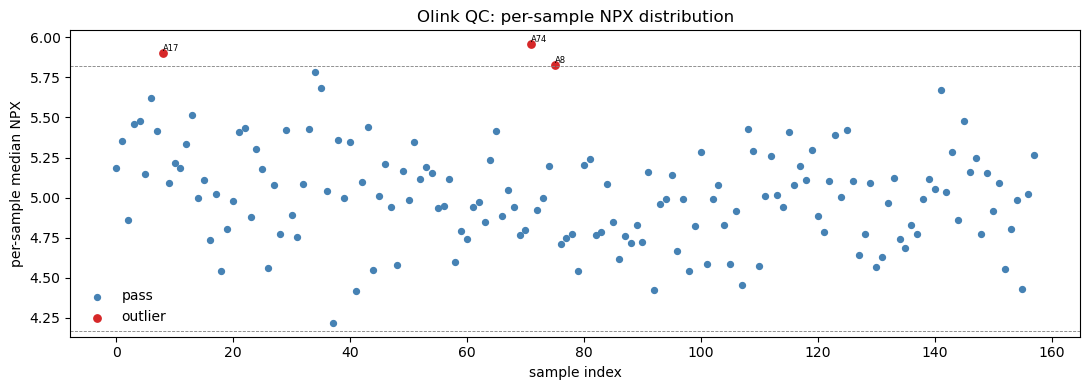
A core sanity check is the per-sample NPX distribution: each sample should have a similar median and spread. An outlying sample (technical failure, low input) shows up as a shifted or compressed boxplot.

# Sample-level QC warnings
qc = npx.drop_duplicates('SampleID')
print('QC_Warning by sample:')
print(qc['QC_Warning'].value_counts(dropna=False))
flagged = qc.loc[qc['QC_Warning'] != 'Pass', 'SampleID'].tolist()
print('\nflagged samples:', flagged if flagged else 'none')
QC_Warning by sample:
QC_Warning
Pass       157
Warning      1
Name: count, dtype: int64

flagged samples: ['A15']
# Assay-level missingness: fraction of samples below LOD per assay
assay_miss = npx.drop_duplicates('Assay')[['Assay', 'MissingFreq']]
print('MissingFreq summary across {} assays:'.format(len(assay_miss)))
print(assay_miss['MissingFreq'].describe()[['min', '50%', 'max']])
print('\nassays with MissingFreq > 0.05:', int((assay_miss['MissingFreq'] > 0.05).sum()))
MissingFreq summary across 184 assays:
min    0.00625
50%    0.05625
max    0.10000
Name: MissingFreq, dtype: float64

assays with MissingFreq > 0.05: 98

Missingness is uniformly low (max ~10%) — a hallmark of affinity proteomics: every assay is measured in every sample, so there is no MNAR imputation problem as in LC-MS/MS. Now the per-sample distribution plot via pyolinkanalyze.olink_qc_plot, which marks samples whose NPX IQR or median falls outside iqr_mult× the cohort spread.

# Per-sample NPX distribution QC plot
fig, ax = plt.subplots(figsize=(11, 4))
poa.olink_qc_plot(npx, sample_col='SampleID', npx_col='NPX', iqr_mult=1.5, ax=ax)
ax.set_title('Olink QC: per-sample NPX distribution')
plt.tight_layout(); plt.show()
../_images/a31fdb3978c90b4eaf2406944ad87e2696fa552829e2982b2415e7b33bbcc992.png
# LOD handling: NCLOD computes a negative-control-based LOD per assay
lod = poa.olink_lod(npx, lod_method='NCLOD', npx_col='NPX',
                    sample_col='SampleID', assay_col='OlinkID', sd_mult=3.0)
print('olink_lod output shape:', lod.shape)
lod[['OlinkID', 'Assay', 'LOD', 'PCNormalizedLOD']].drop_duplicates('OlinkID').head() \
    if 'PCNormalizedLOD' in lod else lod.head()
olink_lod output shape: (29440, 18)
SampleID Index OlinkID UniProt Assay MissingFreq Panel_Version PlateID QC_Warning LOD NPX Subject Treatment Site Time Project Panel below_LOD
0 A1 1 OID01216 O00533 CHL1 0.01875 v.1201 Example_Data_1_CAM.csv Pass 21.333559 12.956143 ID1 Untreated Site_D Baseline data1 Olink Cardiometabolic True
1 A2 2 OID01216 O00533 CHL1 0.01875 v.1201 Example_Data_1_CAM.csv Pass 21.333559 11.269477 ID1 Untreated Site_D Week.6 data1 Olink Cardiometabolic True
2 A3 3 OID01216 O00533 CHL1 0.01875 v.1201 Example_Data_1_CAM.csv Pass 21.333559 25.451070 ID1 Untreated Site_D Week.12 data1 Olink Cardiometabolic False
3 A4 4 OID01216 O00533 CHL1 0.01875 v.1201 Example_Data_1_CAM.csv Pass 21.333559 14.453038 ID2 Untreated Site_C Baseline data1 Olink Cardiometabolic True
4 A5 5 OID01216 O00533 CHL1 0.01875 v.1201 Example_Data_1_CAM.csv Pass 21.333559 7.628712 ID2 Untreated Site_C Week.6 data1 Olink Cardiometabolic True

olink_lod recomputes a Limit-Of-Detection per assay from negative controls (NCLOD = max negative-control NPX + sd_mult×SD). Comparing each measurement to its LOD lets you flag below-LOD values — useful for deciding which low-signal assays to drop before differential testing. Here we keep all assays since missingness is already low.

3. Bridge / batch normalization#

Large Olink studies are run in batches — different plates, different runs, sometimes different sites or years. Each batch has its own systematic NPX offset. To make NPX comparable across batches you use bridge normalization:

  1. Include a set of shared bridging samples (the same physical samples) on every batch.

  2. For each assay, compute the median NPX difference of the bridge samples between the reference batch and the target batch.

  3. Subtract that per-assay offset from the entire target batch.

Good bridge samples are representative (typical NPX, low below-LOD rate) so the offset they define generalizes. pyolinkanalyze.olink_bridge_selector picks them automatically.

# Drop assay controls; keep only study subjects for analysis
npx_s = npx[npx['Treatment'].notna() &
            ~npx['SampleID'].str.startswith('CONTROL')].copy()
print('analysis rows:', npx_s.shape, '| samples:', npx_s['SampleID'].nunique())
analysis rows: (28704, 17) | samples: 156
# Pick 8 representative bridging samples (low below-LOD fraction)
bridge = poa.olink_bridge_selector(npx_s, sample_missing_freq=0.1, n=8, seed=0)
bridge_ids = bridge['SampleID'].tolist()
print('selected bridge samples:', bridge_ids)
bridge
selected bridge samples: ['A70', 'A31', 'B16', 'A66', 'A72', 'B8', 'A26', 'B26']
SampleID PercAssaysBelowLOD MeanNPX
0 A70 0.043478 6.304760
1 A31 0.021739 6.209815
2 B16 0.081522 6.251585
3 A66 0.070652 6.074096
4 A72 0.043478 6.136644
5 B8 0.059783 6.462233
6 A26 0.059783 6.366970
7 B26 0.054348 5.988154

This single dataset is one batch, so there is no second project to genuinely bridge to. To demonstrate the mechanics honestly, we construct a synthetic second batch by adding a uniform +0.7 NPX plate shift to a copy of the data. olink_normalization_bridge should then use the shared bridge samples to detect and remove that shift, restoring the two batches to a common scale.

# Synthetic second batch with a known +0.7 NPX plate offset
p1 = npx_s.copy()
p2 = npx_s.copy()
p2['NPX'] = p2['NPX'] + 0.7
print('mean NPX  P1: {:.3f}  |  P2 (shifted): {:.3f}'
      .format(p1['NPX'].mean(), p2['NPX'].mean()))
mean NPX  P1: 5.889  |  P2 (shifted): 6.589
# Bridge-normalize P2 onto P1 using the shared bridge samples
norm = poa.olink_normalization_bridge(
    p1, p2, bridge_samples=bridge_ids,
    project_1_name='P1', project_2_name='P2', project_ref_name='P1')
after = norm.groupby('Project')['NPX'].mean()
print('mean NPX after bridge normalization:')
print(after.round(3))
mean NPX after bridge normalization:
Project
P1    5.889
P2    5.889
Name: NPX, dtype: float64

After bridge normalization the two batches sit on the same NPX scale — the artificial +0.7 plate offset has been removed using only the 8 shared bridge samples. In a real multi-batch study this is what makes UKB-PPP-scale meta-analysis possible. pyolinkanalyze also offers olink_normalization (intensity/reference-median based) and olink_normalization_reference_medians for when no bridge samples are available.

4. Pivot to AnnData & explore#

pyolinkanalyze’s statistical functions consume the long DataFrame, but for matrix-style exploration (PCA, heatmaps, ov.protein DE) we pivot the long NPX to a samples × proteins AnnData. We index on SampleID, spread Assay across columns, and attach the per-sample design (Treatment, Site, Subject, Time) to obs.

# Long -> wide pivot (samples x proteins)
wide = npx_s.pivot_table(index='SampleID', columns='Assay',
                         values='NPX', aggfunc='mean')
X = wide.to_numpy(dtype=float)
X = np.where(np.isnan(X), np.nanmean(X), X)  # fill the rare below-LOD gap
print('matrix:', X.shape, '| residual NaN:', int(np.isnan(X).sum()))
matrix: (156, 184) | residual NaN: 0
# Build AnnData with per-sample obs and per-protein var metadata
obs = (npx_s.drop_duplicates('SampleID').set_index('SampleID')
       [['Treatment', 'Site', 'Subject', 'Time', 'PlateID']]
       .reindex(wide.index).astype(str))
var = (npx_s.drop_duplicates('Assay').set_index('Assay')
       [['OlinkID', 'UniProt', 'Panel']].reindex(wide.columns))
adata = adt.AnnData(X=X, obs=obs, var=var)
adata
AnnData object with n_obs × n_vars = 156 × 184
    obs: 'Treatment', 'Site', 'Subject', 'Time', 'PlateID'
    var: 'OlinkID', 'UniProt', 'Panel'
# Median-center across samples. log2=False: NPX is ALREADY on a log2 scale!
ov.protein.normalize(adata, method='median', log2=False)
print('normalized; layers:', list(adata.layers.keys()))
normalized; layers: ['raw']
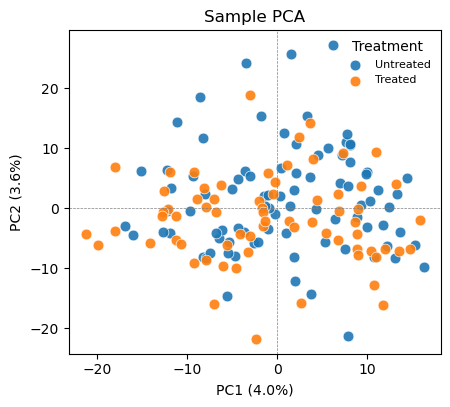
# PCA colored by the biological group of interest
ov.protein.pca_plot(adata, color='Treatment')
plt.show()
../_images/c13560fd9dc42cf9352cdc28c658ea6466849b4cba018a511f1fa1d177868df2.png
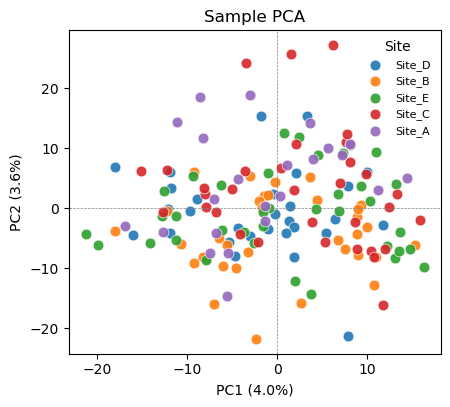
# PCA colored by Site -> check for a technical / batch axis
ov.protein.pca_plot(adata, color='Site')
plt.show()
../_images/125c8e27852677a838c1c4f91ea1eb8b4cd98fa43589fa8ee58164b48dfb20ed.png

Color the same PCA by the biological variable (Treatment) and by a potential technical variable (Site). If samples cluster by Site rather than Treatment, a site/batch effect is dominating the variance and should be regressed out (or handled with a mixed model) before interpreting group differences. If Site is well mixed, the cohort is comparable and the leading variance is biological. pyolinkanalyze.olink_pca_plot produces the equivalent plot directly from the long DataFrame.

5. Differential expression#

Olink panels are small (here 184 assays) and missingness is low, so the standard approach is a per-protein two-group test — no peptide roll-up, no moderated variance borrowing strictly required. We run three complementary analyses:

  • pyolinkanalyze.olink_ttest — Welch t-test per assay, on the long DataFrame.

  • pyolinkanalyze.olink_wilcox — non-parametric Mann–Whitney, robust to non-normal NPX.

  • ov.protein.de(..., method='welch_t') — the same Welch test on the pivoted AnnData.

All use Benjamini–Hochberg FDR. The first two and the third should agree.

# Per-protein Welch t-test on the long NPX DataFrame
tt = poa.olink_ttest(npx_s, variable='Treatment')
n_sig_tt = int((tt['Adjusted_pval'] < 0.05).sum())
print('olink_ttest  : {} / {} assays FDR < 0.05'.format(n_sig_tt, len(tt)))
tt.sort_values('p.value').head()
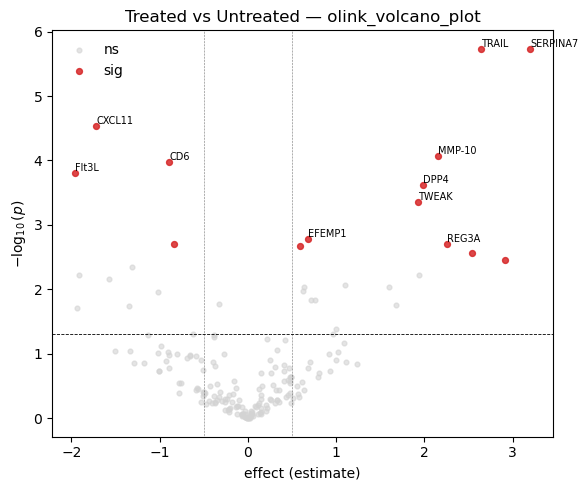
olink_ttest  : 14 / 184 assays FDR < 0.05
OlinkID Assay UniProt Panel term estimate statistic p.value Adjusted_pval Threshold
0 OID00488 TRAIL P50591 Olink Inflammation Untreated - Treated 2.639456 4.970362 0.000002 0.000171 1
1 OID01232 SERPINA7 P05543 Olink Cardiometabolic Untreated - Treated 3.200750 4.978796 0.000002 0.000171 1
2 OID00486 CXCL11 O14625 Olink Inflammation Untreated - Treated -1.718869 -4.309713 0.000030 0.001814 1
3 OID00527 MMP-10 P09238 Olink Inflammation Untreated - Treated 2.149888 4.054861 0.000085 0.003903 1
4 OID00499 CD6 Q8WWJ7 Olink Inflammation Untreated - Treated -0.889727 -3.989178 0.000106 0.003903 1
# Non-parametric Mann-Whitney as a robustness check
wx = poa.olink_wilcox(npx_s, variable='Treatment')
n_sig_wx = int((wx['Adjusted_pval'] < 0.05).sum())
print('olink_wilcox : {} / {} assays FDR < 0.05'.format(n_sig_wx, len(wx)))
olink_wilcox : 13 / 184 assays FDR < 0.05
# Same Welch test via ov.protein.de on the pivoted AnnData
de = ov.protein.de(adata, group='Treatment', method='welch_t')
n_sig_de = int((de['adj.P.Val'] < 0.05).sum())
print('ov.protein.de: {} / {} assays FDR < 0.05'.format(n_sig_de, len(de)))
de.sort_values('P.Value').head()
ov.protein.de: 12 / 184 assays FDR < 0.05
gene logFC AveExpr t P.Value adj.P.Val
0 SERPINA7 3.144091 10.825873 4.910163 0.000003 0.000251
1 TRAIL 2.582797 8.853974 4.883764 0.000003 0.000251
2 CXCL11 -1.775528 4.639429 -4.478312 0.000015 0.000911
3 CD6 -0.946386 2.219474 -4.203037 0.000047 0.002163
4 Flt3L -2.016890 5.019380 -4.046551 0.000083 0.003064
# Cross-check: do the long-format and AnnData Welch tests agree?
cmp = (tt.set_index('Assay')[['p.value']]
         .join(de.set_index('gene')[['P.Value']], how='inner'))
r = np.corrcoef(np.log10(cmp['p.value']), np.log10(cmp['P.Value']))[0, 1]
print('correlation of log10 p-values (olink_ttest vs ov.protein.de): {:.4f}'.format(r))
print('=> the two implementations agree.')
correlation of log10 p-values (olink_ttest vs ov.protein.de): 0.9889
=> the two implementations agree.
# Multi-level factor: one-way ANOVA across the 5 Sites
an = poa.olink_anova(npx_s, variable='Site')
print('olink_anova (Site, 5 levels): {} / {} assays FDR < 0.05'
      .format(int((an['Adjusted_pval'] < 0.05).sum()), len(an)))
an.sort_values('p.value')[['Assay', 'statistic', 'p.value', 'Adjusted_pval']].head()
olink_anova (Site, 5 levels): 22 / 184 assays FDR < 0.05
Assay statistic p.value Adjusted_pval
0 TRAIL 8.137222 0.000006 0.001053
1 CCL18 7.359446 0.000019 0.001280
2 MCP-1 7.180249 0.000026 0.001280
3 PLXNB2 7.124786 0.000028 0.001280
5 IL13 5.355663 0.000464 0.014184

The Welch t-test on the long DataFrame and on the AnnData give effectively identical p-values — a useful consistency check between the two entry points. olink_anova extends the same idea to a multi-level factor (Site); for repeated-measures designs (Subject measured at Baseline/Week.6/Week.12) pyolinkanalyze.olink_lmer fits a per-protein linear mixed model with Subject as a random effect.

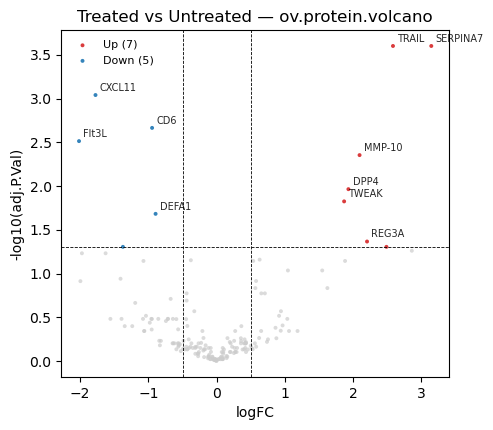
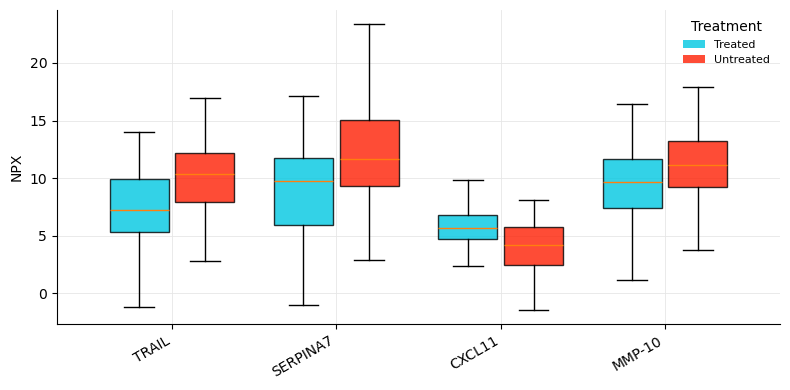
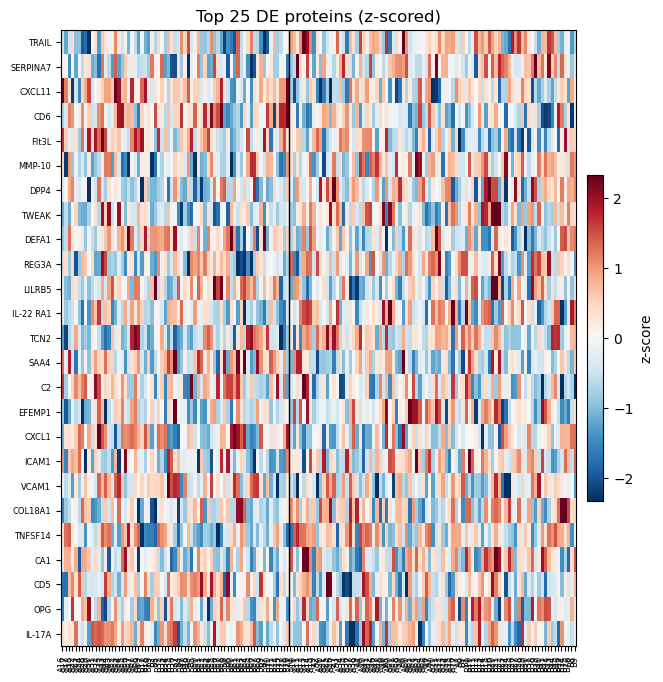
6. Visualization#

Standard DE visuals: a volcano plot (effect size vs significance) to see overall structure, and a heatmap of the top hits to inspect their per-sample pattern.

# Volcano plot from the long-format t-test result
fig, ax = plt.subplots(figsize=(6, 5))
poa.olink_volcano_plot(tt, estimate_col='estimate', p_col='p.value',
                       label_col='Assay', threshold=0.05,
                       abs_fc_cutoff=0.5, n_label=10, ax=ax)
ax.set_title('Treated vs Untreated — olink_volcano_plot')
plt.tight_layout(); plt.show()
../_images/99fa7a567838552a4f8efa21bc45655b0eea9903313013ce32f5e5fc61b708a0.png
# Equivalent volcano from the ov.protein.de result
ov.protein.volcano(de, fc_col='logFC', p_col='adj.P.Val', raw_p_col='P.Value',
                   gene_col='gene', logfc_threshold=0.5, adj_p_threshold=0.05,
                   label_top=10, title='Treated vs Untreated — ov.protein.volcano')
plt.show()
../_images/930e169136528dd054a4471ab188905e93c9a0b7097f870ae3a42722e339dc17.png
# Boxplots of the top differential assays across Treatment
top_ids = tt.sort_values('p.value').head(4)['OlinkID'].tolist()
fig, ax = plt.subplots(figsize=(8, 4))
poa.olink_boxplot(npx_s, variable='Treatment', olinkids=top_ids,
                  label_col='Assay', ax=ax)
plt.tight_layout(); plt.show()
../_images/51f685a7611e9cb1122b16156f4180a6a52be799403ca93cf95910a3370d5caa.png
# Heatmap of the top DE proteins (z-scored per protein)
ov.protein.heatmap(adata, de, group='Treatment', n_top=25,
                   gene_col='gene', p_col='adj.P.Val')
plt.show()
../_images/7e8eba3380a66d7065a61b62258749b276c5f6c4e32a0c41e6e60cbde779d780.png

7. Pathway enrichment#

To move from a list of significant proteins to biology, test whether the hits are enriched for known gene sets. pyolinkanalyze.olink_pathway_enrichment takes the DE result plus a gene_sets dictionary ({set_name: [gene symbols]}) and runs over-representation (ora) or GSEA.

Real analyses supply curated gene sets — MSigDB Hallmark / Reactome / GO, loadable with pyolinkanalyze.read_gmt('hallmark.gmt'). Those .gmt files are not bundled offline, so here we build small illustrative sets directly from the data to demonstrate the call; swap in a real .gmt for production use.

# Illustrative gene sets (replace with read_gmt('hallmark.gmt') in practice)
ranked = tt.sort_values('p.value')
gene_sets = {
    'Top_DE_signature': ranked.head(20)['Assay'].tolist(),
    'Inflammation_panel': npx_s.loc[npx_s['Panel'].str.contains('Inflamm'),
                                    'Assay'].unique().tolist(),
    'Cardiometabolic_panel': npx_s.loc[npx_s['Panel'].str.contains('Cardio'),
                                       'Assay'].unique().tolist(),
}
print({k: len(v) for k, v in gene_sets.items()})
{'Top_DE_signature': 20, 'Inflammation_panel': 92, 'Cardiometabolic_panel': 92}
# Over-representation test of the significant proteins against the gene sets
enr = poa.olink_pathway_enrichment(
    tt, gene_sets=gene_sets, method='ora',
    gene_col='Assay', estimate_col='estimate', p_col='p.value',
    pvalue_cutoff=0.05, min_size=3)
enr[['Description', 'setSize', 'Count', 'GeneRatio', 'pvalue', 'p.adjust']]
Description setSize Count GeneRatio pvalue p.adjust
0 Top_DE_signature 20 20 20/32 8.103508e-19 2.431052e-18
1 Inflammation_panel 92 16 16/32 5.769672e-01 5.769672e-01
2 Cardiometabolic_panel 92 16 16/32 5.769672e-01 5.769672e-01

The result shows, for each gene set, how many of the significant proteins it contains (Count / GeneRatio) and the over-representation p-value. With a curated database (read_gmt of MSigDB/Reactome/GO) this is how Olink hits are mapped to inflammatory, cardiometabolic, or immune pathways. ov.protein.enrich offers an alternative entry point that scores enrichment activity directly on the AnnData using decoupler-style methods.

Summary#

The Olink NPX workflow recipe:

  1. Load the long-format NPX table (ov.datasets.protein_olink() here; pyolinkanalyze.read_npx_* for real files).

  2. QC — sample-level QC_Warning, assay-level MissingFreq/LOD (olink_qc_plot, olink_lod).

  3. Bridge-normalize across plates/batches with olink_bridge_selector + olink_normalization_bridge.

  4. Pivot to a samples × proteins AnnData; explore with pca_plot (biology vs batch).

  5. Differential expression per protein — olink_ttest / olink_wilcox / olink_anova / olink_lmer, or ov.protein.de.

  6. Visualize — olink_volcano_plot, olink_boxplot, ov.protein.heatmap.

  7. Pathway enrichment with olink_pathway_enrichment against MSigDB/Reactome/GO.

How affinity proteomics differs from the LC-MS/MS tutorials:

LC-MS/MS workflow

Olink PEA workflow

Peptide → protein summarization

None — NPX is already per-protein

log2 transform intensities

None — NPX is already log2 (log2=False)

MNAR imputation of many missing values

Not needed — missingness is low

Intensity / median normalization

Bridge normalization across plates/batches

Whole proteome, abundance-biased

Targeted panels, sensitive to low-abundance proteins

Related tutorials: t_protein_01–t_protein_04 cover the mass-spectrometry side — reading MaxQuant/DIA-NN/FragPipe output, peptide summarization, MNAR-aware imputation, and DEqMS/limma differential expression. Use those for discovery LC-MS/MS; use this Olink workflow for targeted, population-scale affinity proteomics.

previous

Differential expression in proteomics: a benchmark with ground truth

next

Structure & Docking

Contents
  • How affinity proteomics differs from mass spectrometry
  • Why it matters
  • 0. Imports
  • 1. Load NPX data
  • 2. Quality control
  • 3. Bridge / batch normalization
  • 4. Pivot to AnnData & explore
  • 5. Differential expression
  • 6. Visualization
  • 7. Pathway enrichment
  • Summary

By Zehua Zeng

© Copyright 2026, 112 Lab, USTB.